Entering the world of user experience design requires more than just a creative eye. It demands a structured approach to problem-solving, empathy for the end-user, and a solid grasp of interaction logic. This guide outlines the essential knowledge required to build a strong foundation in UX design, focusing on principles that remain constant regardless of trends or tools.
Understanding User Experience 🧠
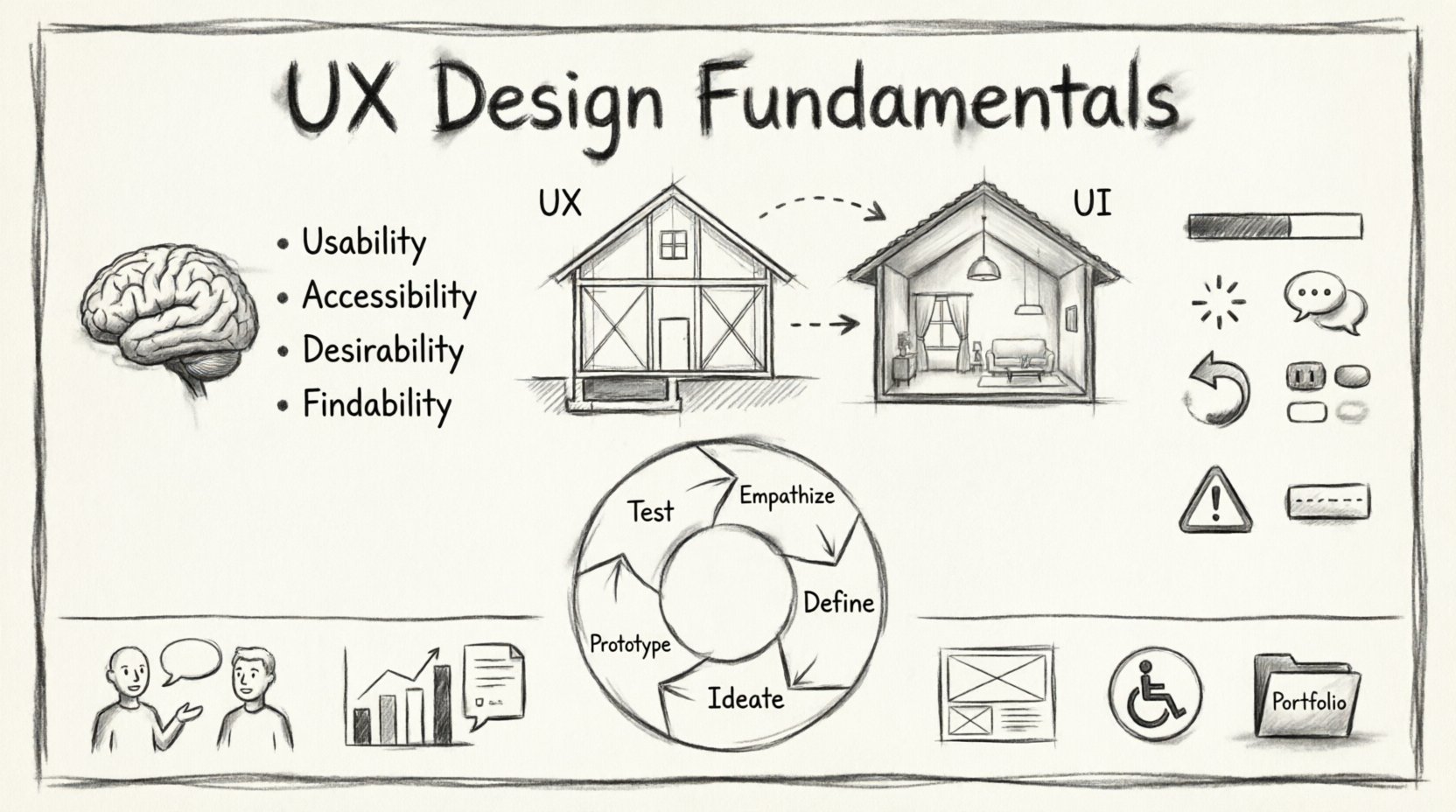
At its core, UX design is the process of enhancing customer satisfaction by improving the usability, accessibility, and pleasure provided in the interaction with a product. It is not merely about how something looks, but how it functions and how the user feels while using it.
- Usability: Can the user achieve their goal efficiently?
- Accessibility: Can people with disabilities use the product?
- Desirability: Does the product evoke an emotional response?
- Findability: Can the user find what they need easily?
When these elements align, the design feels intuitive. When they do not, friction occurs, leading to frustration and abandonment. A successful designer prioritizes the user’s needs above personal aesthetic preferences.
UX vs. UI: Clearing the Confusion 🎨
Many beginners confuse User Experience (UX) with User Interface (UI). While they are closely related, they serve different functions within the product development lifecycle. Understanding the distinction is critical for career clarity.
| Aspect | User Experience (UX) | User Interface (UI) |
|---|---|---|
| Focus | The overall feel and logic of the experience. | The visual styling and layout of the product. |
| Goal | Solve user problems and ensure usability. | Make the product visually appealing and consistent. |
| Deliverables | Wireframes, user flows, personas, research data. | Mockups, style guides, icons, color palettes. |
| Analogy | The blueprint of a house (structure and flow). | The interior decoration (paint, furniture, finishes). |
While UI designers focus on typography, color theory, and spacing, UX designers focus on information architecture, user research, and interaction design. Both roles are necessary for a cohesive digital product.
The Design Thinking Process 🛠️
Most professional workflows follow a framework known as Design Thinking. This iterative process ensures that solutions are grounded in human needs rather than assumptions.
1. Empathize
The journey begins with understanding the people you are designing for. This involves conducting research to uncover their motivations, pain points, and behaviors. You cannot design for a user if you do not know who they are.
- Conduct one-on-one interviews.
- Observe users in their natural environment.
- Review existing data and feedback.
2. Define
Once you have gathered information, you must synthesize it to define the core problem. A well-defined problem statement guides the rest of the design process. It should be specific and focused on the user’s needs.
Example: “New parents need a quick way to log baby feeding times because they are often sleep-deprived and distracted.”
3. Ideate
With a clear problem statement, the team generates a wide range of ideas. Quantity is prioritized over quality at this stage. Brainstorming sessions, sketching, and mind mapping help explore various solutions without judgment.
4. Prototype
This is where ideas take shape. Prototypes range from low-fidelity sketches to high-fidelity interactive models. The goal is to create a tangible representation of the concept to test before full development.
5. Test
Finally, the prototype is tested with real users. This validates assumptions and reveals usability issues. Feedback is collected, analyzed, and used to refine the design. This cycle often repeats, making the process iterative rather than linear.
Core Principles of Usability 💡
Several established principles guide the creation of effective interfaces. Adhering to these reduces cognitive load and helps users navigate with confidence.
1. Visibility of System Status
Users should always know what is happening. If a process is loading, show a progress bar. If a button is clicked, provide immediate feedback. Never leave a user wondering if their action was successful.
2. Match Between System and Real World
Speak the user’s language. Use words, phrases, and concepts familiar to them, rather than system-oriented terms. Follow conventions and real-world expectations so users do not have to learn new mental models.
3. User Control and Freedom
Users often make mistakes. They need a clearly marked “emergency exit” to leave an unwanted state without having to go through an extended process. Back buttons and undo options are essential features.
4. Consistency and Standards
Follow platform conventions. If a button looks like a button on other apps, users will know how to interact with it. Consistency in terminology and actions prevents confusion.
5. Error Prevention
Good design prevents problems before they occur. Confirm critical actions with dialogs or warnings. Offer clear error messages that explain the problem and suggest a solution.
6. Recognition Rather Than Recall
Minimize the user’s memory load. Make objects, actions, and options visible. The user should not have to remember information from one part of the dialogue to another. Instructions should be visible or easily retrievable.
User Research Methods 📊
Research is the backbone of UX. Without it, design decisions are merely guesses. There are various methods to gather insights, each serving a different purpose.
Qualitative Research
This method explores the “why” behind user behavior. It is subjective and focuses on understanding motivations and feelings.
- Interviews: Direct conversations to gather deep insights.
- Usability Testing: Observing users as they attempt to complete tasks.
- Diary Studies: Users log their experiences over a period of time.
Quantitative Research
This method explores the “what” and “how much.” It is objective and focuses on numerical data to identify patterns.
- Surveys: Collecting data from a large group of people.
- A/B Testing: Comparing two versions of a design to see which performs better.
- Analytics: Reviewing data on user behavior, such as click-through rates and bounce rates.
Information Architecture (IA) 🗺️
Information Architecture is the structural design of shared information environments. It organizes content so that users can find what they need and complete their tasks. Poor IA leads to a confusing experience where users get lost.
- Navigation: How users move through the site or app.
- Labeling: How content is named to ensure clarity.
- Organization Systems: How content is grouped (e.g., by category, chronology, or alphabet).
Creating a sitemap is a common way to visualize IA. It provides a bird’s-eye view of the hierarchy and relationships between pages. Card sorting is another technique where users help organize content into groups, ensuring the structure matches their mental models.
Wireframing and Prototyping 📐
Before adding visual details, designers create wireframes. These are low-fidelity sketches that outline the structure of a page. They focus on layout, content placement, and functionality without the distraction of colors or images.
Why Wireframe?
- Speed: They are quick to produce and modify.
- Focus: They keep the team focused on structure and flow.
- Communication: They serve as a blueprint for developers.
Once the wireframe is approved, it evolves into a prototype. Prototypes simulate the final product’s interactivity. They allow stakeholders to experience the flow before a single line of code is written. This saves time and resources by catching issues early.
Accessibility (A11Y) ♿
Designing for accessibility means creating products that can be used by people with diverse abilities. This is not just a legal requirement in many regions; it is an ethical obligation. An inclusive design benefits everyone.
Key Considerations
- Color Contrast: Ensure text is readable against its background for users with visual impairments.
- Keyboard Navigation: All interactive elements must be accessible without a mouse.
- Screen Readers: Images and icons should have alternative text descriptions.
- Focus States: Users navigating via keyboard need to know which element is currently selected.
Following guidelines such as the Web Content Accessibility Guidelines (WCAG) ensures that your designs meet industry standards for inclusivity.
Common Mistakes to Avoid ⚠️
New designers often fall into specific traps that hinder their progress. Awareness of these pitfalls can save time and improve the quality of work.
| Mistake | Consequence | Solution |
|---|---|---|
| Designing for yourself | Products may not meet actual user needs. | Conduct user research and testing. |
| Ignoring mobile users | Alienating a large portion of the audience. | Adopt a mobile-first approach. |
| Overusing creativity | Confusing the user with non-standard patterns. | Stick to established conventions. |
| Skipping documentation | Developers may misunderstand the design intent. | Create detailed specs and style guides. |
Soft Skills for Success 🤝
Technical skills are only part of the equation. Successful UX designers possess strong soft skills that facilitate collaboration and problem-solving.
- Communication: You must articulate your design decisions clearly to stakeholders and developers.
- Empathy: The ability to truly understand the user’s perspective is the defining trait of a UX designer.
- Adaptability: Projects change, requirements shift, and feedback evolves. Flexibility is key.
- Curiosity: A desire to learn about technology, psychology, and business keeps designs relevant.
Building Your Portfolio 💼
When you are ready to seek opportunities, your portfolio becomes your primary tool. It should showcase your process, not just the final visuals. Recruiters want to see how you think.
- Case Studies: Detail the problem, your role, the research, the solution, and the outcome.
- Process Artifacts: Include sketches, notes, and research findings.
- Clarity: Use clear headings and concise text to explain complex ideas.
- Relevance: Highlight projects that align with the types of roles you are applying for.
Remember that the quality of your case studies matters more than the quantity. A few well-documented projects are better than a dozen shallow ones. Ensure your work is accessible and easy to navigate, as this demonstrates your commitment to usability from the start.
Staying Current 🔍
The field of design is constantly evolving. New technologies, such as voice interfaces and augmented reality, are changing how people interact with digital products. To remain effective, continuous learning is necessary.
- Read industry blogs and publications.
- Attend webinars and workshops.
- Follow thought leaders on social platforms.
- Analyze successful products in your daily life.
By understanding the trends without chasing every fad, you can maintain a solid foundation while adapting to new opportunities. The fundamental principles of human behavior rarely change, even if the technology does.
Final Thoughts 🌟
Starting a career in UX design is a journey of continuous learning. It requires patience, research, and a commitment to serving the user. By mastering the fundamentals outlined here, you build a toolkit that will serve you throughout your career. Focus on solving real problems, listen to your users, and let data guide your decisions. The path to great design is paved with empathy and iteration.
As you begin, remember that every expert was once a beginner. Your unique perspective is valuable. Trust the process, stay curious, and keep designing with purpose.