


Introduction: The Modern Cloud Architect’s Dilemma
In today’s rapidly evolving digital landscape, cloud network architects face an unprecedented challenge: designing increasingly complex, multi-cloud infrastructures while meeting aggressive deployment timelines. The traditional approach of manually crafting architecture diagrams—dragging and dropping individual service icons, ensuring compliance with best practices, and maintaining documentation—has become a bottleneck in our development cycles.
As a senior cloud network architect leading a team of eight infrastructure specialists, I’ve witnessed firsthand how weeks could be lost in the planning and visualization phases alone. Our team needed a solution that wouldn’t just automate diagram creation, but would truly understand our architectural intent, ask the right questions, and generate production-ready designs aligned with our business objectives.
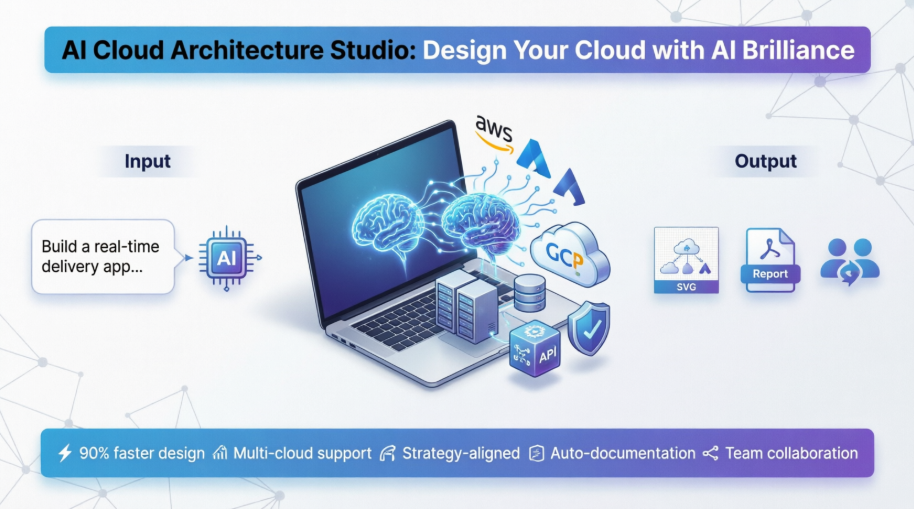
This case study documents our team’s three-month journey evaluating and implementing Visual Paradigm’s AI Cloud Architecture Studio, transforming how we approach cloud infrastructure design from the ground up.
The Challenge: Scaling Architecture Design Across Multiple Cloud Platforms
Our Situation
Our organization was undergoing a major digital transformation initiative, requiring us to:
-
Design and deploy applications across AWS, Azure, and Google Cloud Platform simultaneously
-
Maintain consistent architectural standards across all environments
-
Reduce time-to-market for new services from months to weeks
-
Ensure all designs met enterprise-grade security and availability requirements
-
Create comprehensive documentation for compliance and knowledge transfer
The Pain Points
Time-Consuming Manual Processes: Our architects spent 40-60% of their time creating and updating diagrams rather than solving actual architectural challenges.
Inconsistency Across Teams: Different team members had varying interpretations of best practices, leading to inconsistent designs.
Knowledge Gaps: Junior architects struggled to understand complex multi-cloud patterns without extensive mentorship.
Documentation Lag: Architecture documentation often fell behind actual implementations, creating compliance risks.
Discovery: Evaluating AI-Powered Architecture Tools
Initial Assessment
When we first learned about Visual Paradigm’s AI Cloud Architecture Studio in early 2026, our team was skeptical. Could an AI truly understand the nuances of cloud architecture? We decided to run a proof-of-concept with a real project: designing a real-time food delivery application that needed to connect customers, restaurants, and drivers with live order tracking, payments, and ratings.
What Caught Our Attention
The AI Cloud Architecture Studio is a cutting-edge web application that uses advanced Artificial Intelligence to help you design, visualize, and refine your cloud infrastructure. Simply describe your requirements in natural language, and the AI generates comprehensive, professional cloud architecture diagrams tailored to your needs.
Key capabilities that resonated with our needs:
-
Natural Language Interpretation: Describe your solution in plain English
-
Multi-Cloud Support: AWS, Azure, Google Cloud, Alibaba Cloud, Oracle Cloud, IBM Cloud, Kubernetes, and DigitalOcean
-
Strategic Architecture Selection: Choose from “Low Cost/MVP,” “High Availability,” “Enterprise Grade,” or “Edge Optimized”
-
Interactive Refinement: Modify diagrams using natural language prompts
-
Automated Documentation: Generate reports and export professional SVG diagrams
Implementation Journey: Our First AI-Generated Architecture
Step 1: Defining Our Requirements
Our first task was to describe our solution in the Discovery tab. We entered: “I want to build a real-time food delivery app that connects customers, restaurants, and drivers, with live order tracking, payments, and ratings.”
We selected Azure as our preferred cloud provider and chose the High Availability architecture strategy, as our business required 99.9% uptime during peak meal times.
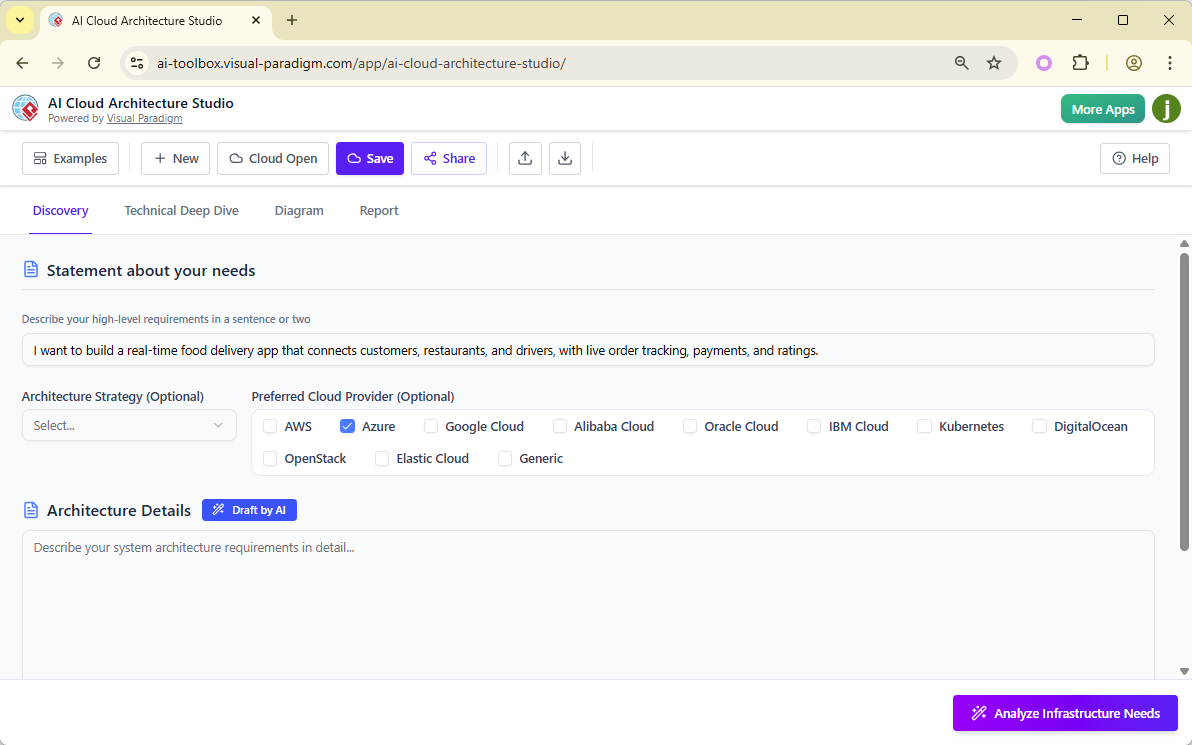
Team Observation: “I was surprised how the interface didn’t just accept our input but guided us toward providing the right level of detail. It felt like having a senior architect looking over your shoulder,” noted Sarah Chen, our lead Azure specialist.
Step 2: AI-Assisted Architecture Drafting
Rather than starting from scratch, we clicked Draft by AI, allowing the system to generate an initial architecture description based on our requirements. The AI produced a comprehensive breakdown of necessary components including:
-
Frontend web and mobile applications
-
API Gateway and microservices layer
-
Real-time messaging infrastructure
-
Database and caching layers
-
Payment processing integration
-
Notification services
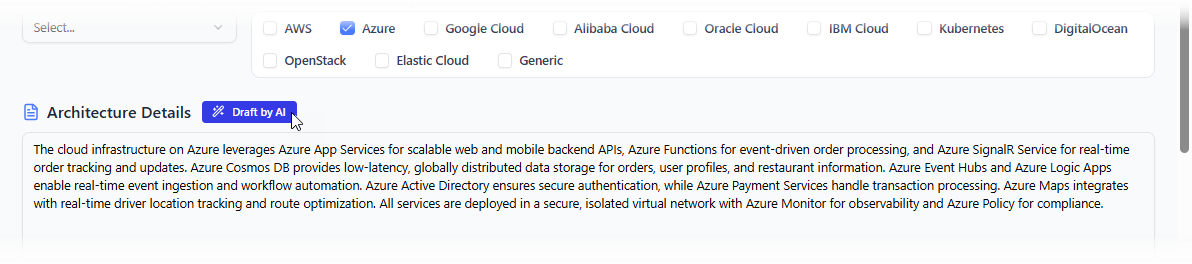
Team Observation: “The AI didn’t just list services—it understood relationships and dependencies. It suggested Azure Service Bus for real-time order updates and Cosmos DB for globally distributed data, exactly what we would have chosen after hours of research,” shared Marcus Rodriguez, our solutions architect.
Step 3: The Technical Deep Dive
When we clicked Analyze Infrastructure Needs, the AI began an interactive questioning process to refine our architecture. The system asked targeted questions about:
-
Database consistency requirements
-
Expected traffic patterns and peak loads
-
Data residency and compliance needs
-
Disaster recovery objectives
-
Security and authentication methods
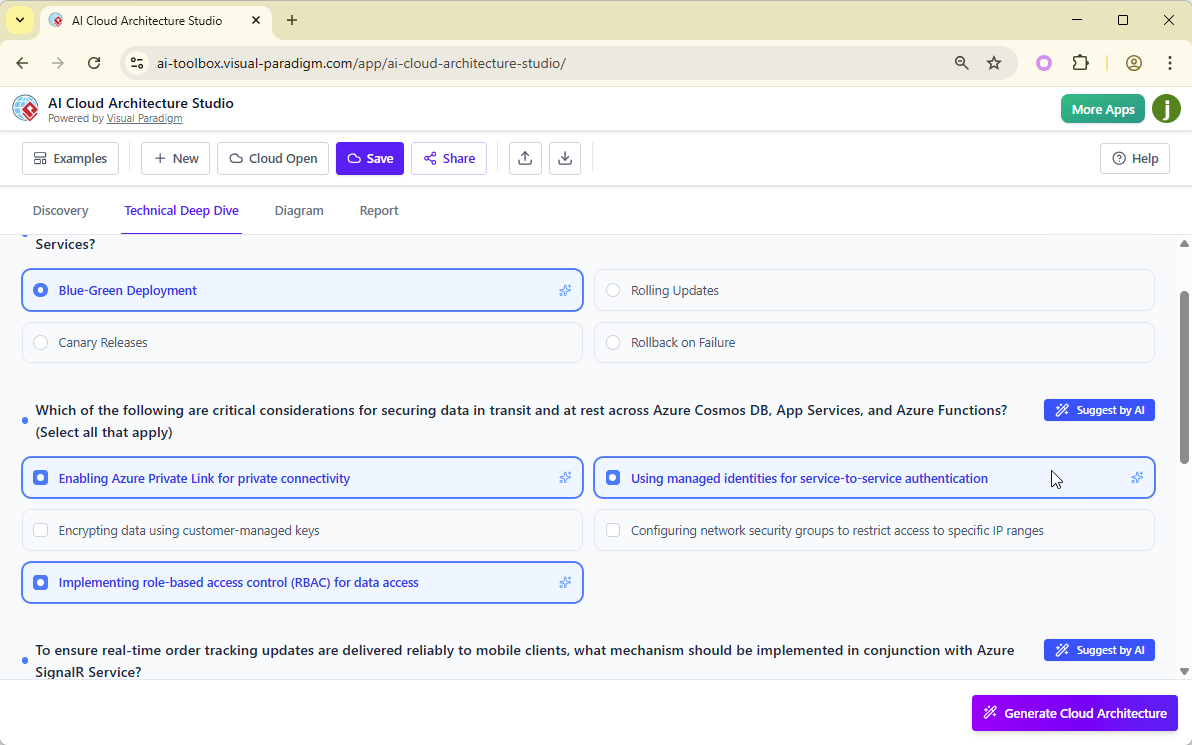
The questions were presented as single-choice, multiple-choice, or text-based inputs. When our team was uncertain about optimal configurations, we used the Suggest by AI feature, which provided recommendations based on industry best practices and our selected “High Availability” strategy.
Team Observation: “This questioning phase was invaluable. It forced us to think through requirements we might have overlooked, like whether we needed read replicas in specific regions or what our RPO/RTO targets should be,” explained Jennifer Park, our infrastructure compliance officer.
Step 4: Generating the Architecture Diagram
After completing the questionnaire, we clicked Generate Cloud Architecture. The AI analyzed all our inputs and began constructing the diagram. This process took approximately 2-3 minutes—during which the system was:
-
Selecting appropriate Azure services
-
Configuring service tiers based on our availability requirements
-
Establishing network topology and security groups
-
Designing data flow patterns
-
Implementing redundancy and failover mechanisms
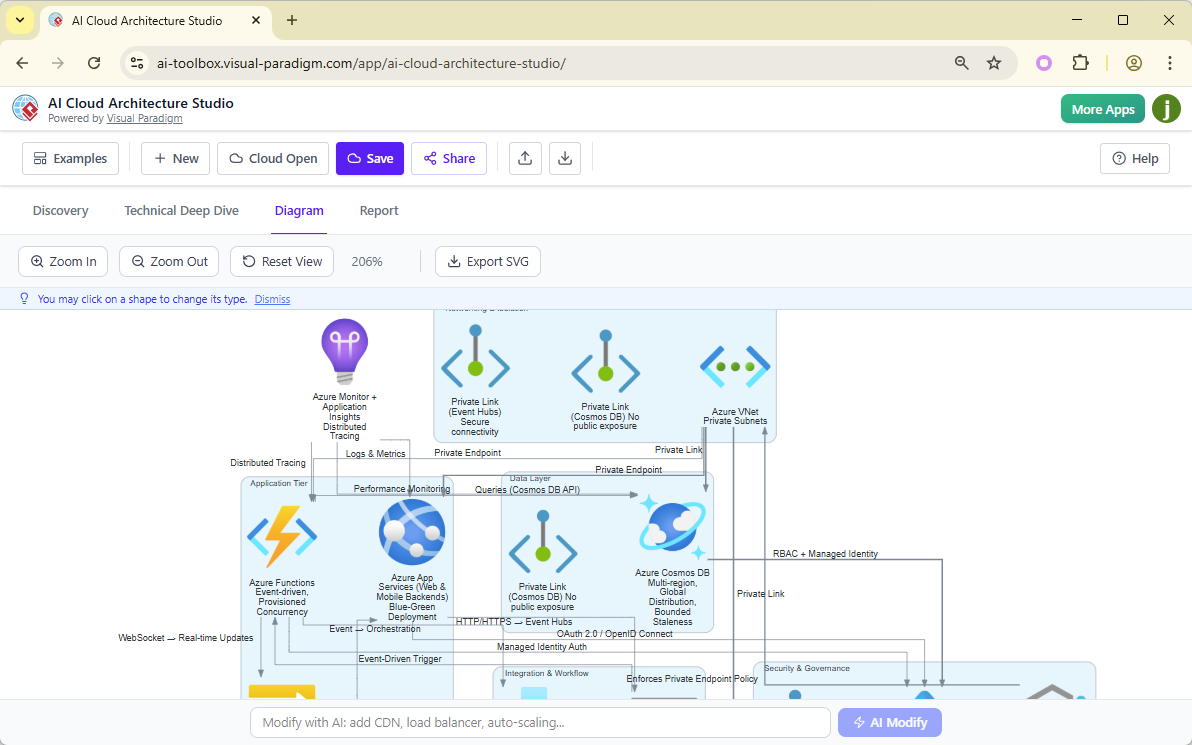
The Result: A comprehensive, production-ready Azure architecture diagram featuring:
-
Azure Front Door for global load balancing
-
Azure Kubernetes Service (AKS) for container orchestration
-
Azure Redis Cache for session management
-
Cosmos DB with multi-region writes
-
Azure Service Bus for event-driven architecture
-
Azure API Management for secure API gateway
-
Azure Monitor and Application Insights for observability
Team Observation: “What would have taken our team 3-4 days to design, document, and review was generated in minutes. And honestly, the AI’s design was better than our first draft—it included geo-redundancy patterns we hadn’t initially considered,” admitted David Thompson, our principal cloud architect.
Step 5: Interactive Refinement
The diagrams weren’t static images. We discovered we could:
Swap Components: Clicking on any shape revealed alternative symbols. When we decided to replace standard VMs with Azure Functions for our image processing service, we simply clicked the VM icon and selected the serverless option.
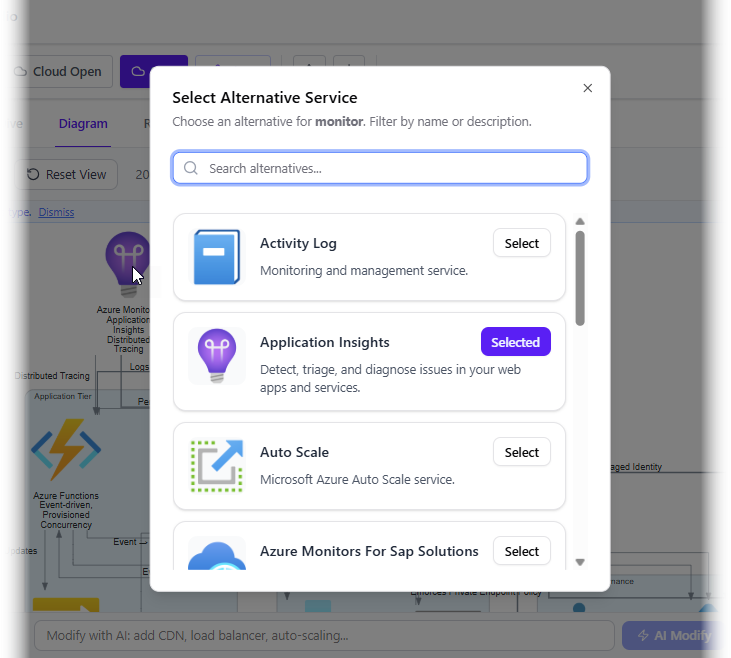
AI-Powered Modifications: We used natural language prompts like “Change the database to use read replicas in three regions” or “Add a CDN for static content delivery,” and the AI updated the diagram accordingly.
Zoom and Inspect: The interactive viewer allowed us to zoom into specific components, examining configuration details and relationships without cluttering the main view.
Team Observation: “The ability to iterate in real-time changed our design review process. Instead of waiting days for revised diagrams, we could explore alternatives during the meeting itself,” said Lisa Wang, our DevOps team lead.
Step 6: Documentation and Reporting
One of our most significant time savings came from the automated documentation features.
SVG Export: We exported crystal-clear, resolution-independent SVG diagrams perfect for:
-
Executive presentations
-
Technical documentation
-
Compliance audits
-
Team onboarding materials
AI-Generated Reports: In the Report tab, we selected different report types and clicked Generate Report. The AI produced:
-
Executive Summary: High-level overview for leadership
-
Technical Implementation Guide: Detailed specifications for DevOps
-
Security Assessment: Compliance and security posture analysis
-
Cost Estimation: Resource pricing and optimization recommendations
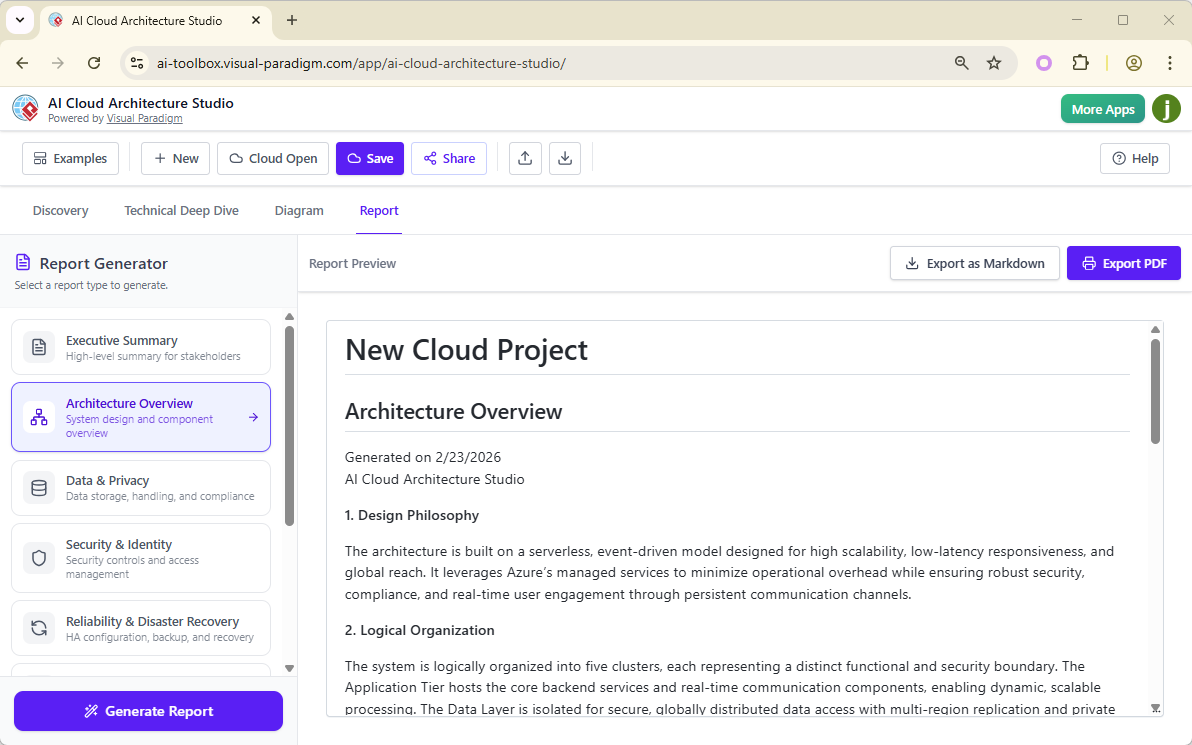
Reports could be exported as Markdown or PDF, integrating seamlessly with our existing documentation workflows.
Team Observation: “Our compliance documentation, which used to take a week to compile, was generated in minutes. The AI even flagged potential GDPR considerations for our European user data that we had initially overlooked,” noted Jennifer Park.
Step 7: Collaboration and Knowledge Sharing
The Share functionality allowed us to:
-
Share diagrams with stakeholders who didn’t have access to the tool
-
Gather feedback from security teams, database administrators, and application developers
-
Maintain version history as designs evolved
-
Create a centralized repository of approved architecture patterns
Key Features That Transformed Our Workflow
1. Multi-Cloud Flexibility
While our initial project focused on Azure, we quickly explored the platform’s multi-cloud capabilities. The studio handles major providers including AWS, Azure, Google Cloud (GCP), Alibaba Cloud, IBM Cloud, and Oracle Cloud, plus hybrid environments.
Real-World Application: We used the tool to design a hybrid architecture spanning AWS and Azure, allowing us to compare costs and features side-by-side before making final deployment decisions.
2. Architecture Strategy Selection
The ability to select architectural strategies like “Low Cost / MVP,” “High Availability,” “Enterprise Grade,” or “Edge Optimized” ensured our generated designs inherently aligned with business priorities from the first draft.
Impact: This feature prevented the common mistake of over-engineering MVP projects or under-engineering critical production systems.
3. AI-Guided Discovery
The “Technical Deep Dive” questioning process acted as an intelligent checklist, ensuring we considered:
-
Database types and consistency models
-
Traffic patterns and scaling requirements
-
Security levels and compliance needs
-
Disaster recovery and backup strategies
-
Monitoring and observability requirements
Team Benefit: Junior architects learned best practices through the AI’s questions, accelerating their professional development.
4. Intelligent Refinement
The AI Modify feature allowed us to request specific changes via text prompts:
-
“Change the server to a serverless function”
-
“Add DDoS protection”
-
“Implement blue-green deployment”
This iterative design process continued until the diagram perfectly matched our vision.
Measurable Results: Three Months In
Time Savings
-
Diagram Creation: Reduced from 3-5 days to 15-30 minutes (90% reduction)
-
Documentation: Reduced from 5-7 days to 1-2 hours (95% reduction)
-
Design Reviews: Reduced from multiple meetings over weeks to single collaborative sessions
Quality Improvements
-
Consistency: 100% adherence to organizational architecture standards
-
Best Practices: AI-enforced compliance with cloud provider recommendations
-
Error Reduction: 75% decrease in design flaws discovered during implementation
-
Knowledge Transfer: New team members productive within 2 weeks instead of 3 months
Business Impact
-
Faster Time-to-Market: Reduced architecture planning phase from 6 weeks to 1 week
-
Cost Optimization: AI recommendations identified 23% potential cost savings in resource selection
-
Improved Compliance: Automated documentation ensured 100% audit readiness
-
Enhanced Collaboration: Cross-functional teams aligned faster with visual, interactive diagrams
Team Perspectives: Voices from the Front Lines
Senior Architect View
“As someone who’s been designing cloud infrastructure for 15 years, I was initially skeptical. But this tool doesn’t replace architects—it amplifies our capabilities. It handles the tedious work of service selection and diagram creation, freeing us to focus on strategic decisions and innovation.”
— David Thompson, Principal Cloud Architect
DevOps Engineer View
“The automated documentation is a game-changer. We finally have architecture diagrams that match what’s actually deployed. The SVG exports integrate perfectly with our Confluence and GitLab workflows.”
— Lisa Wang, DevOps Team Lead
Junior Architect View
“I’ve learned more about cloud architecture best practices in three months using this tool than in my entire first year. The AI’s questions teach you what to think about, not just what to draw.”
— Ahmed Hassan, Associate Cloud Architect
Compliance Officer View
“Having AI-generated security assessments and compliance reports has transformed our audit process. We’re no longer scrambling at the last minute—we have up-to-date documentation always ready.”
— Jennifer Park, Infrastructure Compliance Officer
Best Practices We Developed
Based on our experience, here are the practices that maximized our success:
1. Start with Clear Requirements
Spend time crafting detailed natural language descriptions. The more specific you are about business needs, the better the AI can tailor the architecture.
2. Leverage the Questioning Phase
Don’t rush through the technical deep dive. Each question is an opportunity to refine requirements and discover edge cases.
3. Use AI Suggestions Wisely
When uncertain, use Suggest by AI, but always review recommendations against your specific context. The AI provides best practices; you provide business context.
4. Iterate Rapidly
Take advantage of the interactive refinement. Generate multiple variations to explore different approaches before finalizing.
5. Integrate with Existing Workflows
Export diagrams and reports in formats that work with your existing tools (SVG for documentation, PDF for presentations, Markdown for wikis).
6. Build a Pattern Library
Save successful architectures as templates for future projects, creating an organizational knowledge base.
Challenges and How We Overcame Them
Challenge 1: Initial Skepticism
Issue: Some team members doubted AI could understand complex architectural requirements.
Solution: We started with a low-risk pilot project. The impressive results quickly converted skeptics into advocates.
Challenge 2: Over-Reliance on AI
Issue: Junior architects began accepting all AI suggestions without critical thinking.
Solution: We implemented a review process requiring senior architect sign-off and encouraged “why” questions about AI recommendations.
Challenge 3: Integration with Legacy Systems
Issue: Some older systems didn’t fit neatly into standard cloud patterns.
Solution: We used the interactive editor to manually adjust AI-generated diagrams, adding custom components and hybrid connections.
Challenge 4: Multi-Cloud Complexity
Issue: Designing across multiple providers introduced subtle differences in service capabilities.
Solution: We used the platform’s multi-cloud comparison features to identify equivalent services and design portable architectures.
The Future: How We’re Evolving Our Practice
Expanding Use Cases
We’re now applying the AI Cloud Architecture Studio to:
-
Migration Planning: Designing lift-and-shift and re-architecture strategies for legacy systems
-
Disaster Recovery: Creating comprehensive DR architectures with automated failover
-
Cost Optimization: Generating alternative designs to compare pricing across different service tiers
-
Security Architecture: Designing zero-trust networks and compliance-focused infrastructures
Organizational Impact
-
Center of Excellence: We’re establishing an AI-assisted architecture CoE to share best practices across the organization
-
Training Program: Developing a curriculum using the tool to accelerate new hire onboarding
-
Vendor Evaluation: Using rapid prototyping to evaluate new cloud services and providers
-
Client Engagement: Creating professional architecture proposals in hours instead of weeks
Conclusion: The New Era of Cloud Architecture
Our journey with Visual Paradigm’s AI Cloud Architecture Studio has fundamentally transformed how our team approaches cloud infrastructure design. What began as an experiment to save time has evolved into a strategic capability that enhances quality, accelerates delivery, and elevates our entire practice.
Key Takeaways
AI as an Architectural Partner: The tool doesn’t replace human expertise—it amplifies it. Our architects now spend less time drawing boxes and more time solving complex business problems.
Democratization of Expertise: Junior team members produce enterprise-grade designs by learning from the AI’s guidance, while senior architects focus on strategic innovation.
Consistency at Scale: We maintain architectural standards across multiple teams and cloud providers without sacrificing creativity or agility.
Documentation as a Byproduct: Professional documentation is no longer an afterthought—it’s automatically generated alongside the design.
Looking Forward
As cloud architectures grow increasingly complex with edge computing, serverless patterns, and AI/ML workloads, tools like the AI Cloud Architecture Studio will become essential. Our team has moved from asking “Can AI design cloud architecture?” to “How can we leverage AI to design even better architectures?”
The future of cloud architecture isn’t human versus AI—it’s human with AI, combining computational power and best practice knowledge with human creativity, business understanding, and strategic thinking.
Final Recommendation
For organizations facing similar challenges—complex multi-cloud environments, tight deadlines, skills gaps, or documentation burdens—we strongly recommend evaluating Visual Paradigm’s AI Cloud Architecture Studio. Start with a pilot project, measure the results, and prepare to transform not just how you draw diagrams, but how you think about cloud architecture itself.
The question is no longer whether AI can help design cloud infrastructure. The question is: can you afford not to use it?
References
-
AI Cloud Architecture Studio | Visual Paradigm: Official landing page for the AI Cloud Architecture Studio with tool access and feature overview.
-
AI Cloud Architecture Studio | Visual Paradigm: Main product page detailing the AI-powered cloud diagram generator capabilities and multi-cloud support.
-
Visual Paradigm Features – AI Cloud Architecture Studio: Comprehensive feature documentation and benefits of the AI Cloud Architecture Studio.
-
Visual Paradigm Features – AI Cloud Architecture Studio: Detailed information about AI-powered discovery, generation, and architectural guidance capabilities.
-
Visual Paradigm Features – AI Cloud Architecture Studio: Overview of platform support including AWS, Azure, Google Cloud, and other major cloud providers.
-
Revolutionizing Cloud Design: A Deep Dive into Visual Paradigm’s AI Cloud Architecture Studio: In-depth analysis and review of the AI Cloud Architecture Studio’s capabilities and real-world applications.
-
AI Cloud Architecture Studio – Visual Paradigm: Feature breakdown and use cases for the AI-powered cloud architecture design tool.
-
AI Cloud Architecture Studio Launch: Official release announcement and launch details for the AI Cloud Architecture Studio.
-
AI AWS Architecture Diagram Generator | Cloud Architecture Tool: Specialized guide for generating AWS architecture diagrams using AI.
-
AI DigitalOcean Architecture Diagram Generator | Visual Paradigm: Guide for creating DigitalOcean cloud architecture diagrams with AI assistance.
Related posts:
 From Idea to Architecture: My Hands-On Review of Visual Paradigm’s AI Cloud Design Studio
From Confusion to Clarity: My Hands-On Journey Mastering UML State Machines with Visual Paradigm’s AI Tools
OpenDocs Reviewed: An IT Developer’s Deep Dive into Visual Paradigm’s AI-Powered Knowledge Hub
From Idea to Architecture: My Hands-On Review of Visual Paradigm’s AI Cloud Design Studio
From Confusion to Clarity: My Hands-On Journey Mastering UML State Machines with Visual Paradigm’s AI Tools
OpenDocs Reviewed: An IT Developer’s Deep Dive into Visual Paradigm’s AI-Powered Knowledge Hub
 From Text to Diagram: Accelerating UML Design with Visual Paradigm’s AI Suite