Designing a database from scratch can feel overwhelming, especially when you’re juggling business requirements, technical constraints, and data integrity concerns. Traditional database design methods often require extensive manual work, deep technical expertise, and countless hours of trial and error. But what if you could transform a simple text description into a fully normalized, production-ready database schema in minutes?
Enter the era of AI-powered database design tools. These innovative platforms are revolutionizing how developers, analysts, and business stakeholders approach database modeling. In this comprehensive guide, we’ll explore how modern online database schema generators are making professional database design accessible to everyone.
Why Traditional Database Design Falls Short
For decades, database design has been a specialized skill requiring years of experience. Most traditional database modeling tools are essentially sophisticated drawing applications that leave you to manually translate business concepts into technical specifications. You’re expected to:
- Manually identify entities and relationships
- Remember complex normalization rules
- Write SQL DDL scripts by hand
- Test your design only after implementation
- Create documentation separately
This fragmented approach leads to errors, miscommunication between teams, and costly rework. That’s why forward-thinking organizations are turning to AI database design generators that automate the entire workflow.
What Makes an AI Database Design Tool Different?
Modern AI-powered database modeling tools like Visual Paradigm Online offer something fundamentally different: an intelligent, guided workflow that bridges the gap between business ideas and technical implementation.
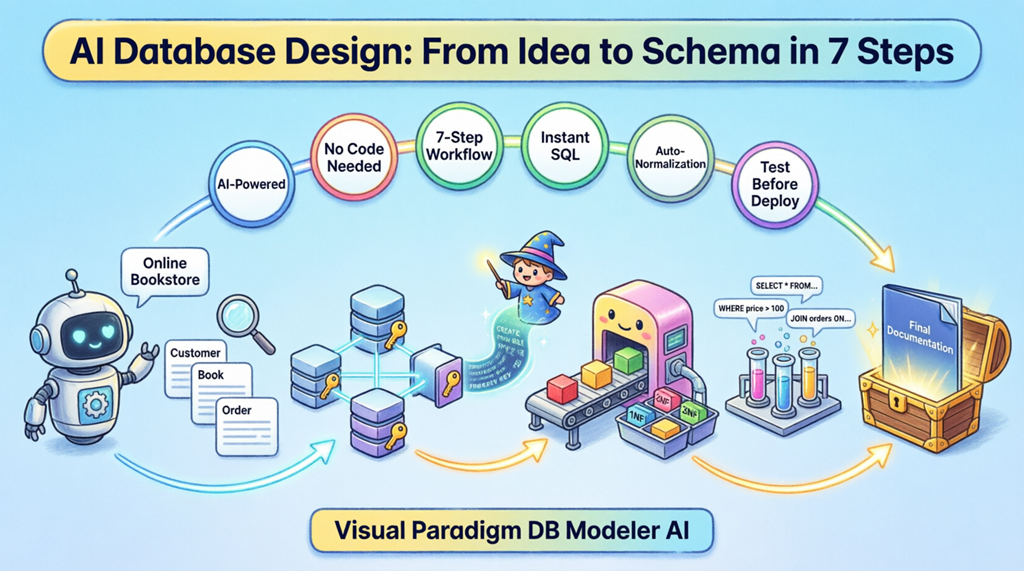
Let’s walk through how a typical online database design maker transforms your requirements into a professional database schema using a real-world example: an Online Bookstore system.
Step 1: Define Your Problem in Plain Language
The journey begins with the simplest step possible—describing what you want to build. Instead of drawing diagrams or writing code, you simply tell the AI database schema generator about your project.
For our bookstore example, you might enter: “I need a database to manage books, authors, customer orders, and reviews.” The artificial intelligence then expands this into a comprehensive problem description, identifying key requirements like ISBN tracking, pricing structures, shipping addresses, and customer authentication.
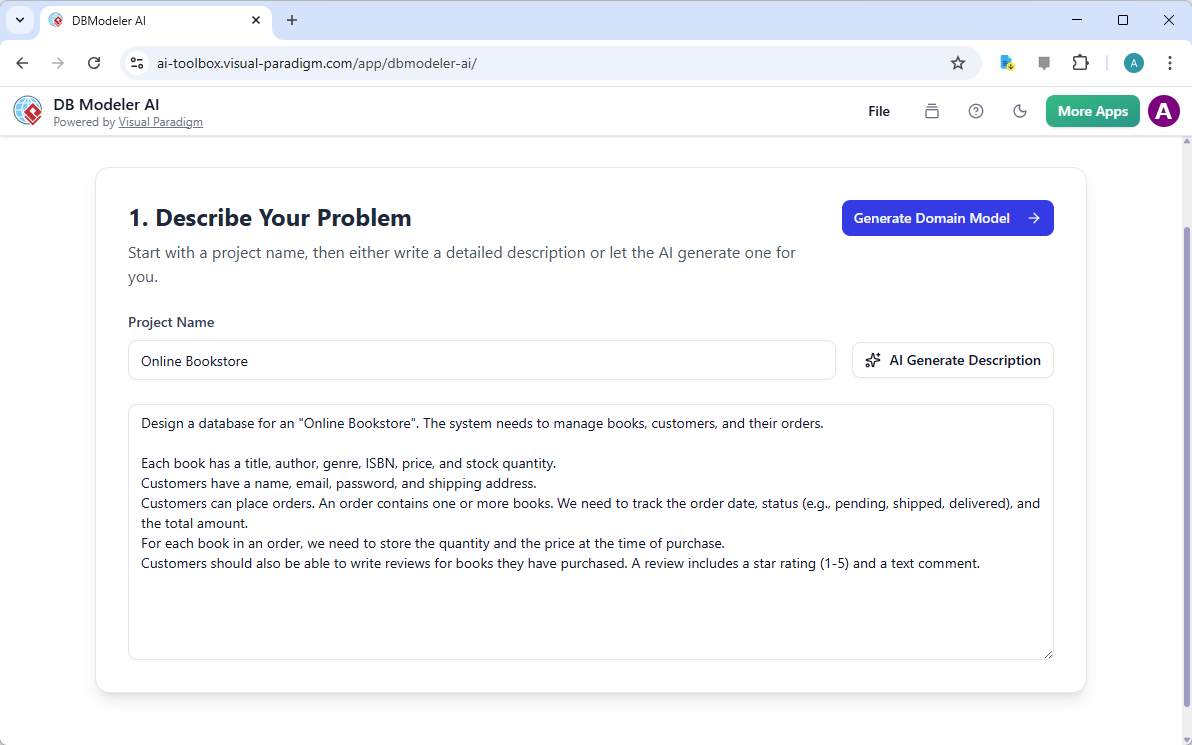
This natural language approach makes database design tools accessible to non-technical stakeholders, ensuring everyone agrees on requirements before any technical work begins.
Step 2: Visualize with Domain Class Diagrams
Once your requirements are defined, the AI database modeling tool generates a high-level Domain Class Diagram. This conceptual model focuses purely on business logic, showing entities like Customer, Book, Order, and Author without worrying about technical database constraints.
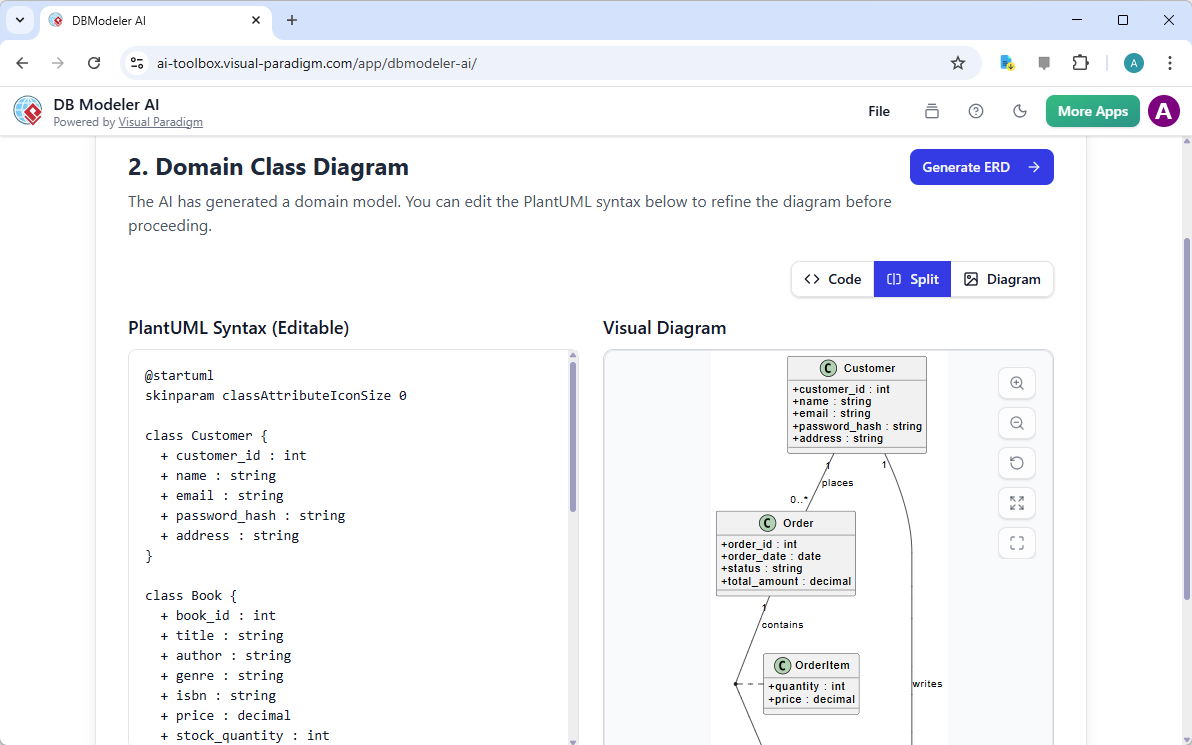
This stage is crucial because it allows business analysts and developers to validate the conceptual structure together. The online class diagram generator handles the technical translation automatically, letting you focus on whether the model accurately represents your business needs.
Step 3: Generate Professional ERD Models
With your domain model approved, the tool advances to creating a detailed Entity-Relationship Diagram (ERD). This is where your AI ERD generator adds technical depth, identifying:
- Primary keys for each entity
- Foreign key relationships
- Associative entities for many-to-many relationships
- Cardinality constraints
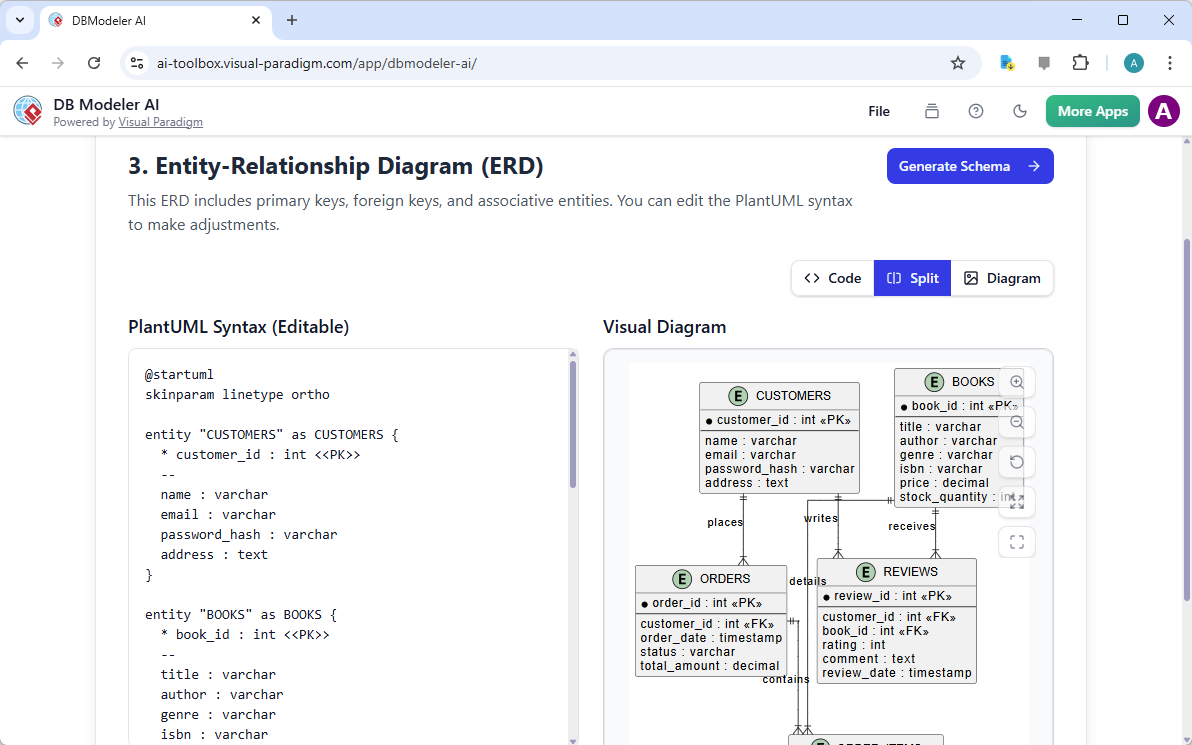
For our bookstore, the professional ERD software clearly shows how Reviews connect to both Customers and Books, how Orders contain multiple Books, and how Authors relate to their publications. This visual representation is invaluable for understanding data flow before writing a single line of code.
Step 4: Automatic SQL Schema Generation
Here’s where most traditional database design tools leave you stranded—with a pretty diagram but no actual database. An AI-powered SQL generator takes the next critical step by producing ready-to-execute SQL DDL (Data Definition Language) scripts.
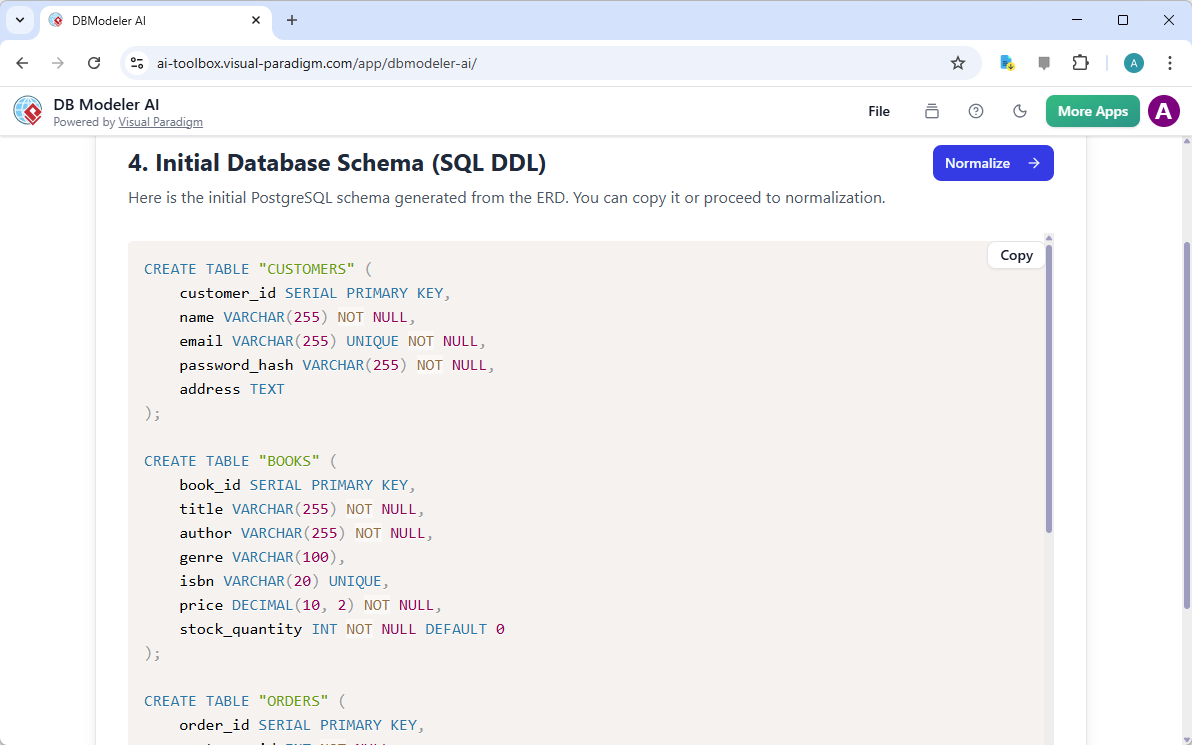
The online SQL schema generator creates complete CREATE TABLE statements with proper data types (INTEGER, VARCHAR, DECIMAL), constraints (PRIMARY KEY, FOREIGN KEY, NOT NULL), and indexes. You can review the exact code that will run on PostgreSQL, MySQL, or your preferred database system.
Step 5: AI-Powered Normalization
This is where modern database normalization tools truly shine. Creating tables is easy; creating efficient tables requires expertise. The AI normalization assistant automatically applies normalization rules to optimize your schema:
- First Normal Form (1NF): Eliminates repeating groups
- Second Normal Form (2NF): Removes partial dependencies
- Third Normal Form (3NF): Eliminates transitive dependencies
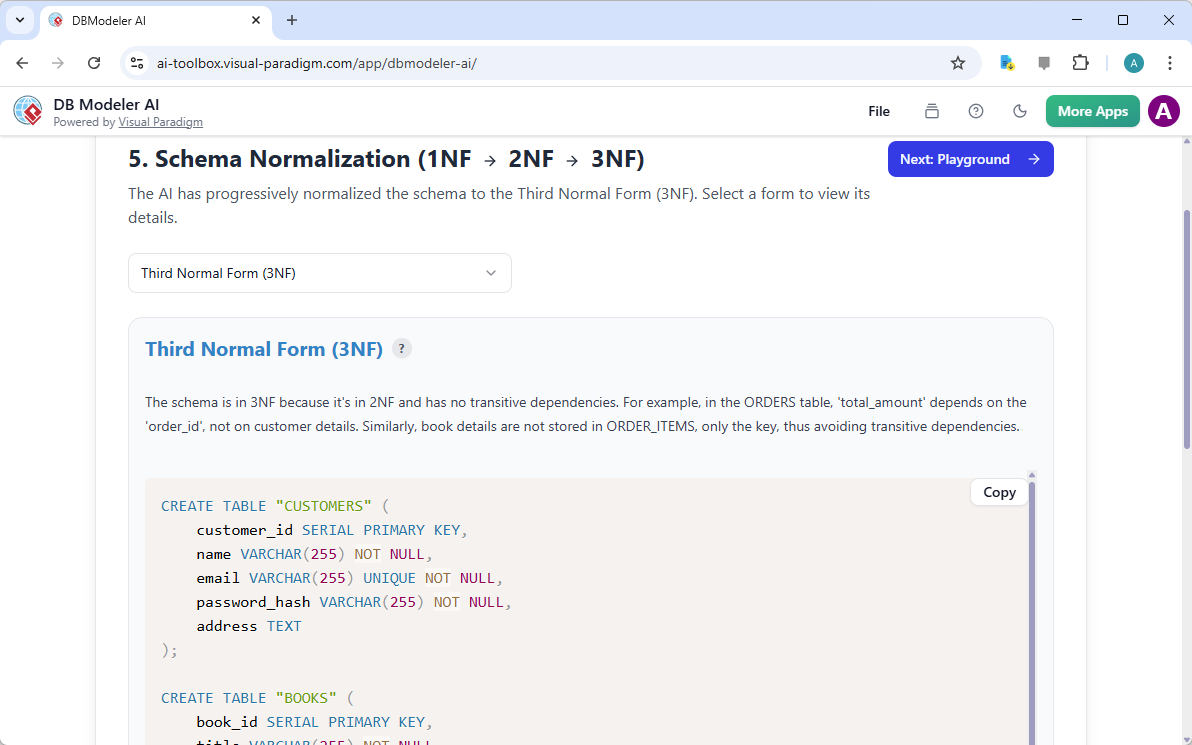
This automated database optimization tool ensures your design prevents data redundancy, update anomalies, and performance issues—tasks that typically require senior database architect expertise.
Step 6: Interactive Testing Playground
Most online database design tools stop at diagram generation, leaving you to hope your design works. Advanced AI database testing tools provide an interactive playground where you can validate your schema before deployment.
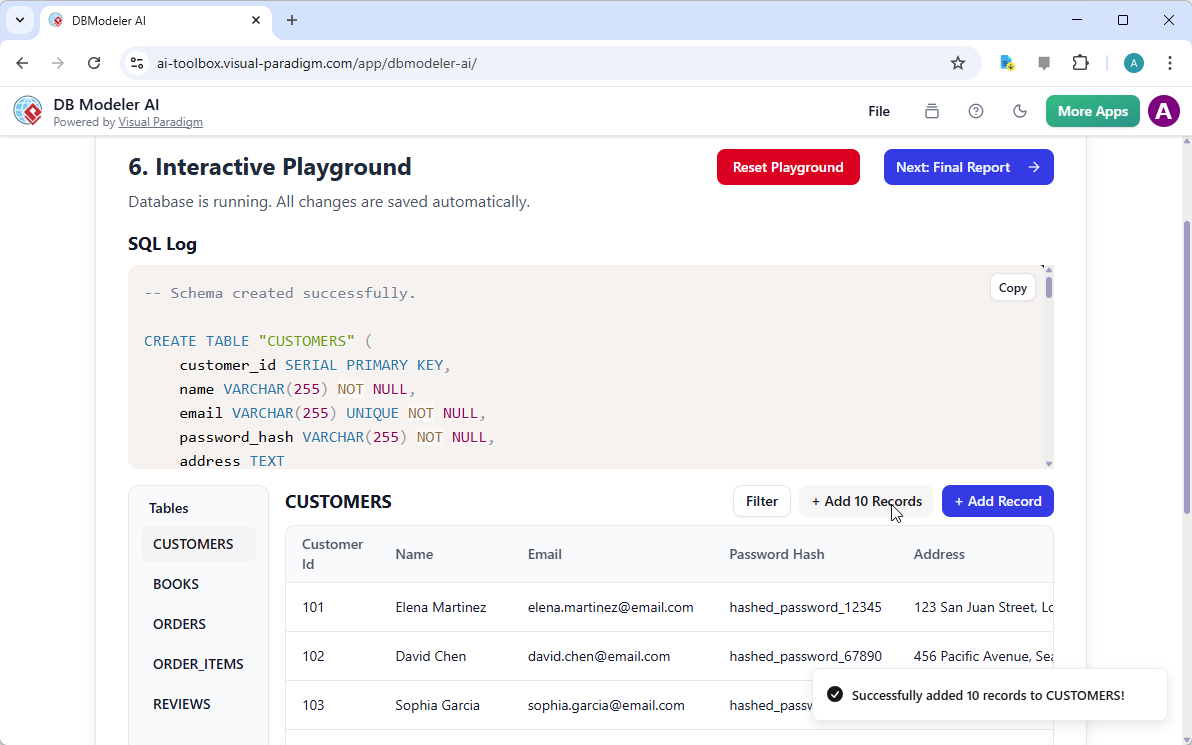
In this simulated environment, you can:
- Insert sample records
- Execute SELECT queries
- Test UPDATE and DELETE operations
- Verify relationships work correctly
- See real SQL execution results
This database schema validator catches design flaws early, saving hours of debugging during actual implementation.
Step 7: Comprehensive Documentation Generation
The final step produces a complete database design report that serves as your project’s single source of truth. This document includes:
- Original problem description
- All generated diagrams (Class Diagram, ERD)
- Normalized SQL schema
- Data dictionary
- Relationship documentation
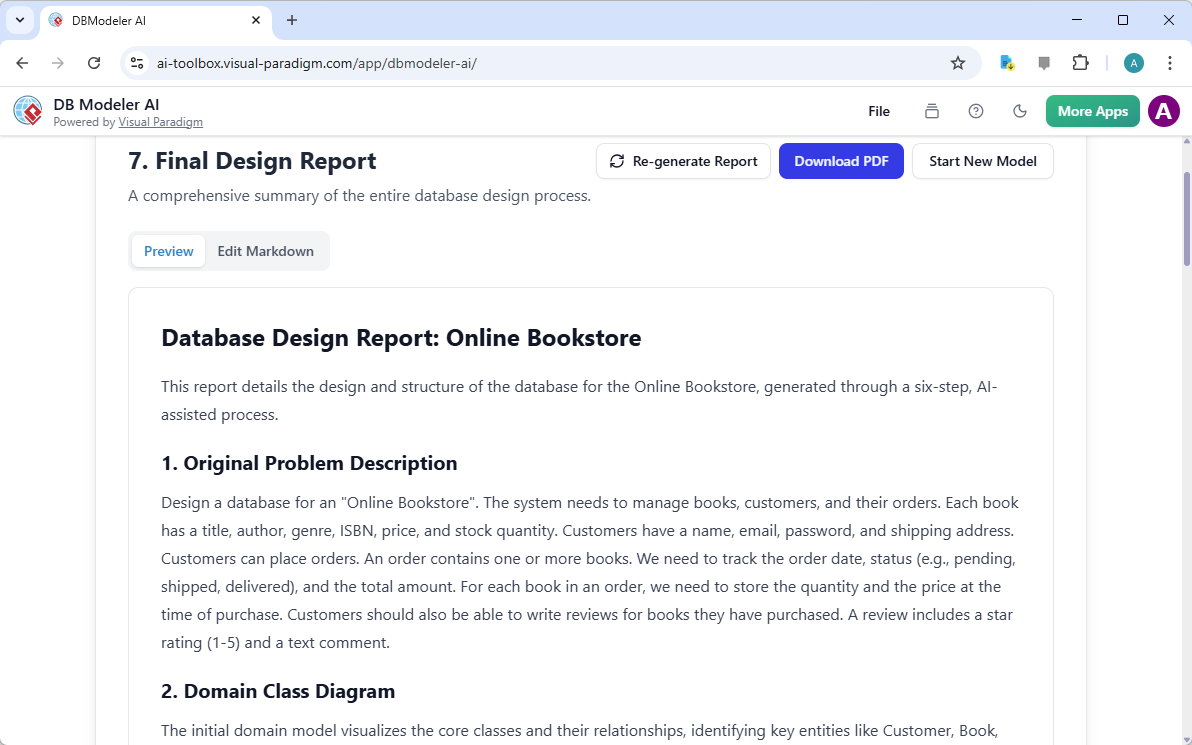
This automated database documentation generator ensures smooth handoffs between teams and provides essential reference material for future maintenance.
Key Advantages of AI Database Design Tools
1. Accessibility for Non-Technical Users
With an easy-to-use database schema generator, business analysts can participate meaningfully in database design without learning SQL or normalization theory.
2. Consistency and Best Practices
The AI database modeling assistant applies industry best practices consistently, eliminating human error and ensuring professional-quality results every time.
3. Rapid Prototyping
What used to take days now takes minutes. The quick database design maker allows you to iterate quickly, testing multiple design approaches before committing to one.
4. Reduced Development Costs
By catching design flaws early and automating repetitive tasks, the online database design tool significantly reduces development time and costly rework.
5. Enhanced Collaboration
Visual diagrams and clear documentation bridge the communication gap between technical and non-technical stakeholders, ensuring everyone shares the same understanding.
Choosing the Right AI Database Design Tool
When evaluating AI-powered database modeling tools, consider these essential features:
- Guided Workflow: Look for tools that provide step-by-step guidance rather than just diagramming capabilities
- Normalization Support: Ensure the tool includes automated normalization features
- SQL Generation: Verify support for your target database system (PostgreSQL, MySQL, SQL Server, etc.)
- Testing Capabilities: Interactive testing environments save significant time
- Export Options: Multiple format exports (SQL, PDF, images) provide flexibility
- Collaboration Features: Cloud-based tools enable team collaboration
Real-World Applications
Modern AI database design generators serve various use cases:
Startups: Rapidly prototype MVP databases without hiring expensive database architects
Enterprises: Standardize database design practices across multiple development teams
Educational Institutions: Teach database concepts with immediate visual feedback
Consultants: Deliver professional database designs to clients faster
Legacy System Modernization: Use reverse engineering capabilities to document and improve existing databases
Getting Started with AI Database Design
Ready to experience the future of database modeling? DB Modeler AI from Visual Paradigm Online offers a comprehensive AI-powered database modeling solution that guides you through every step of the design process.
Whether you’re a student learning database concepts, a developer prototyping a new application, or a business analyst defining requirements, this intelligent database design tool provides the clarity and efficiency you need.
Visit the DB Modeler AI page to learn more about its features, or try the tool now and transform your database design workflow today.
Additional Resources for Database Design Excellence
To deepen your understanding of modern database design practices, explore these comprehensive resources:
- Database Design with ERD Tools: Master scalable database architectures using industry best practices
- Understanding Entity-Relationship Diagrams: Learn the fundamentals of ERD modeling for system development
- DBModeler AI Overview: Discover how AI-driven tools accelerate rapid database design
- Relational Database Modeling Tutorial: Step-by-step guide from conceptual design to implementation
- Professional ERD Tool Suite: Complete solution for modeling, visualizing, and generating databases
- Complete Database Design Tutorial: Leverage visual modeling tools for robust database development
- Reverse Engineering Databases: Transform existing databases into visual models
- Streamlining ER Modeling: Simplify the transition from concept to deployment
- Creating Database Specifications: Develop precise technical specifications for consistency
- AI JSON-to-CRUD Table Generator: Automatically generate dynamic data structures from JSON
Conclusion
The landscape of database design has fundamentally changed. You no longer need years of specialized training or manual coding expertise to create professional, normalized database schemas. Modern AI-powered database design tools democratize this critical skill, making it accessible to developers, analysts, and business stakeholders alike.
By leveraging an intelligent database schema generator, you ensure your projects are built on solid foundations while dramatically reducing development time and eliminating common design errors. The combination of AI automation, guided workflows, and interactive testing provides the confidence to move from concept to production faster than ever before.
Embrace the future of database design. Your next project deserves the efficiency, accuracy, and professionalism that only modern AI database modeling tools can provide.
Related posts:
 Definitive Overview of ER Diagrams: The Complete Blueprint for Modern Data Architecture
 Building Resilient ER Diagrams: Strategies to Prevent Cascading Failures in Distributed Systems
 From Concept to Cloud: A Team’s Journey Implementing AI-Powered Architecture Design with Visual Paradigm
Diagram-as-Code Made Simple: A Comprehensive Guide to Visual Paradigm VPasCode
From Concept to Cloud: A Team’s Journey Implementing AI-Powered Architecture Design with Visual Paradigm
Diagram-as-Code Made Simple: A Comprehensive Guide to Visual Paradigm VPasCode