Effective business process management relies heavily on clear communication. When multiple departments or external entities interact within a workflow, ambiguity can lead to errors, delays, and frustration. Business Process Model and Notation (BPMN) provides a standardized visual language to address this complexity. At the heart of this language lies the concept of collaboration, primarily achieved through Pools and Lanes. Understanding how to utilize these elements correctly ensures that every stakeholder knows their role, responsibilities, and interactions within a process.
This guide explores the structural integrity of BPMN collaboration diagrams. We will examine the mechanics of Pools and Lanes, the distinction between internal and external flows, and the best practices for maintaining clarity in complex environments. By the end of this article, you will have a solid foundation for modeling cross-functional processes without relying on jargon or unverified claims.
Understanding the BPMN Pool 🏊♂️
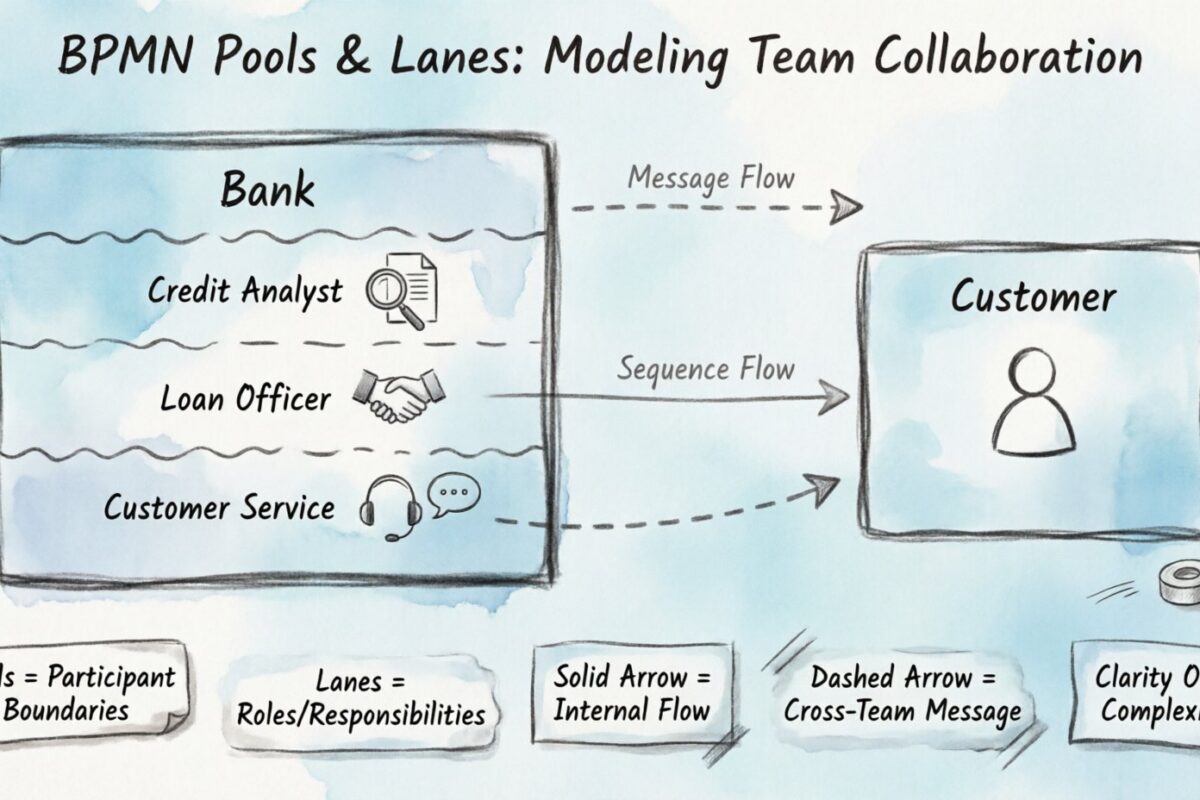
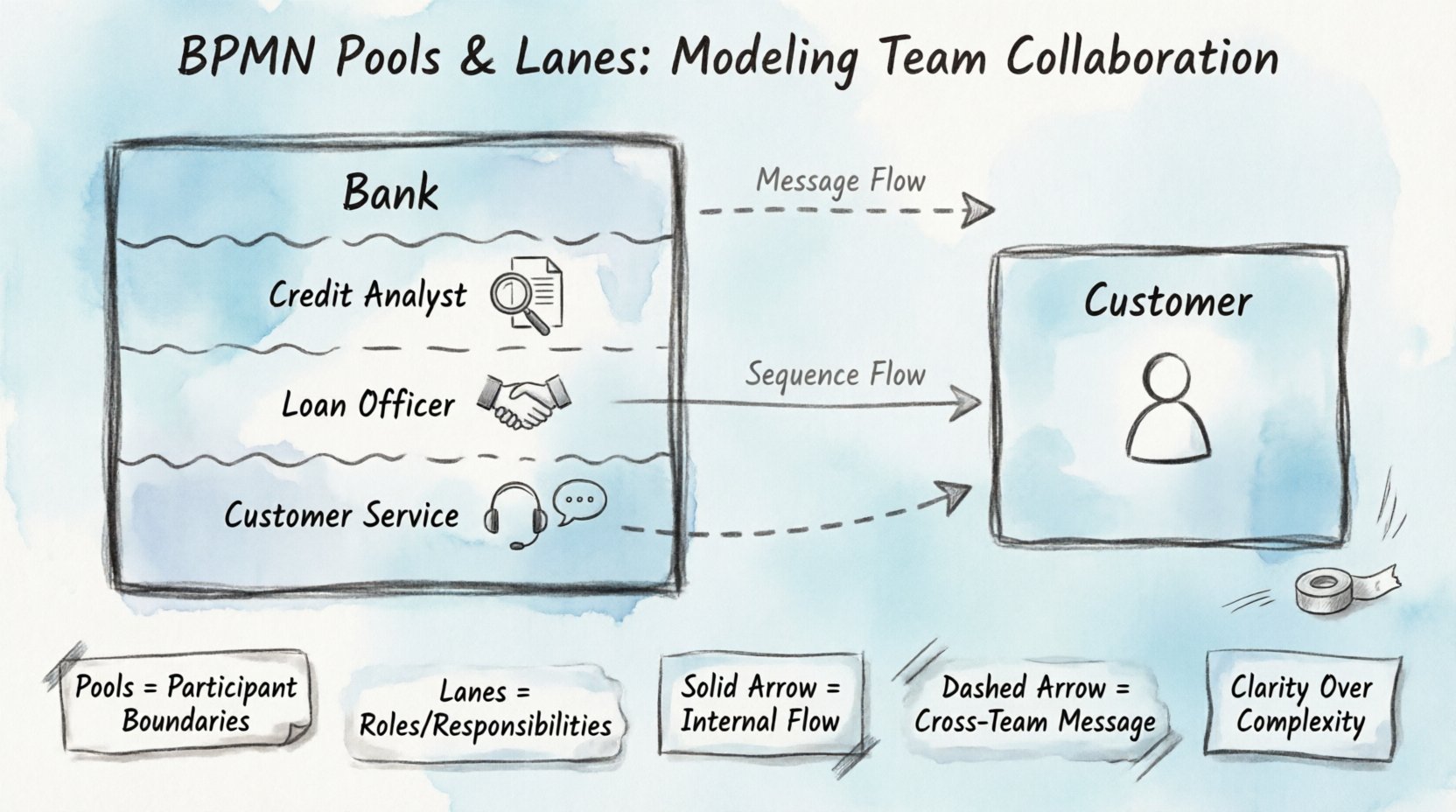
A Pool represents a participant in a process. It is the container that defines the boundaries of a specific entity. This entity could be an entire organization, a specific department, or an external partner. Visually, a Pool is depicted as a large rectangle with a thick border. Inside this rectangle, the process activities occur.
There are two primary types of Pools based on their relationship to the process:
- Private Pools: These represent internal processes within a single organization. The activities inside are not visible to others.
- Public Pools: These are often used to show interactions with external entities. The interface is visible to the other participants.
When modeling a process, the Pool serves as the primary boundary. Anything outside the Pool belongs to a different participant. This separation is critical for defining data ownership and process visibility. If an activity is outside the Pool, it is not part of this specific entity’s workflow.
Key Characteristics of Pools
- Boundaries: Clearly define the scope of the participant.
- Independence: Each Pool operates independently regarding internal logic.
- Interaction: Pools must interact to complete the overall business objective.
Consider a scenario involving a customer and a bank. The customer has their own Pool, and the bank has its own Pool. The customer initiates a transaction, but the actual processing happens within the Bank Pool. The visual separation prevents confusion about who is responsible for which step.
The Role of Lanes within Pools 🚦
While Pools define the participant, Lanes define the roles within that participant. A Lane is a subdivision of a Pool. It acts as a visual separator that organizes activities based on responsibility. Lanes are drawn horizontally or vertically inside the Pool.
This structure is essential for multi-team collaboration. Without Lanes, a process diagram becomes a tangled web of activities. Lanes introduce order by grouping related tasks together. For example, in a Loan Approval process, one Lane might contain “Credit Check” activities, while another contains “Customer Communication” activities.
Types of Lanes
| Type | Function | Example |
|---|---|---|
| Organizational | Groups tasks by department | Finance, HR, Operations |
| Functional | Groups tasks by specific job role | Manager, Clerk, Analyst |
| System | Groups tasks by software or automation | ERP System, Email Service |
When designing Lanes, it is important to avoid over-segmentation. Too many Lanes can make the diagram cluttered and difficult to read. Aim for a balance that highlights the flow of responsibility without creating visual noise.
Best Practices for Lanes
- Consistency: Keep the orientation of Lanes consistent throughout the diagram.
- Labeling: Clearly label every Lane to identify the responsible party.
- Spanning: Avoid having activities span across multiple Lanes unless absolutely necessary for clarity.
- Alignment: Align tasks vertically or horizontally depending on the flow direction.
Modeling Collaboration and Interaction 🔄
The true power of BPMN lies in how Pools and Lanes interact. When multiple participants are involved, the process must show how information and control pass between them. There are two distinct types of connectors used in this context: Sequence Flows and Message Flows.
Sequence Flows vs. Message Flows
- Sequence Flow: Used within a single Lane or Pool. It shows the order of activities. The arrow is a solid line with a thin arrowhead.
- Message Flow: Used between different Pools. It shows the exchange of information. The arrow is a dashed line with a hollow arrowhead.
This distinction is critical. Confusing a Sequence Flow with a Message Flow is a common error that misrepresents the process logic. A Sequence Flow implies direct control, while a Message Flow implies communication.
Interaction Patterns
Collaboration often follows specific patterns. Understanding these patterns helps in designing robust processes.
- Request/Response: One Pool sends a request, and the other Pool responds. This requires a trigger event on both sides.
- Notification: One Pool sends information to another without expecting an immediate response.
- Confirmation: One Pool requires explicit acknowledgment from another before proceeding.
When modeling these interactions, ensure that every outgoing Message Flow has a corresponding incoming Message Flow. Orphaned messages indicate a broken process logic.
Handling Cross-Functional Complexity 🧩
As processes grow, the number of Pools and Lanes increases. This introduces complexity that must be managed carefully. Complex diagrams often suffer from “spaghetti logic,” where lines cross over each other, making the diagram unreadable.
Strategies for Complexity
- Collaboration Diagrams: Use a high-level diagram to show the interaction between Pools, and detailed diagrams for internal Lane logic.
- Call Activities: Use a Call Activity to reference a sub-process. This keeps the main diagram clean while retaining detail in a separate view.
- Grouping: Use Groups to visually cluster related activities without affecting the flow logic.
- Swimlanes: Ensure that Lanes are not too narrow. Allow enough space for activity labels.
Another technique is the use of Message Pools. In some cases, a Pool represents a system rather than a human. This helps distinguish between human decision-making and automated system actions.
Common Pitfalls and How to Avoid Them ⚠️
Even experienced modelers make mistakes. Recognizing these errors early can save significant time during the review process.
1. The Boundary Problem
A common mistake is placing an activity outside its assigned Lane or Pool. If an activity belongs to the Finance Department, it should not be in the Sales Lane. If it is not part of the process, it should not be in the diagram at all.
2. The Flow Type Error
Using a Sequence Flow between two different Pools is incorrect. This implies the first Pool controls the second, which violates the independence of participants. Always use a Message Flow for cross-Pool interactions.
3. The Orphaned Message
Every Message Flow must be connected to an Event. A message cannot simply float in space. It must start from a Send Task or Intermediate Message Event and end at a Receive Task or Intermediate Message Event.
4. The Lane Overlap
Activities should not span multiple Lanes unless the task is truly shared. If a task is shared, it is often better to model it as a Message Flow between two separate tasks in different Lanes.
Advanced Scenarios: Choreography and Collaboration 🎭
Beyond standard Pools and Lanes, BPMN offers specialized diagrams for complex interactions. The Choreography diagram is designed specifically to show the interaction between participants without detailing the internal logic of each.
Choreography vs. Collaboration
| Feature | Collaboration Diagram | Choreography Diagram |
|---|---|---|
| Focus | Process logic and internal steps | Interaction and message exchange |
| Pools | Explicitly shown | Implicit (Participants) |
| Lanes | Used for roles | Not used |
| Flow Type | Sequence and Message | Interaction Flow |
Choreography diagrams are useful when the internal details of the participants are confidential or irrelevant to the interaction agreement. They focus solely on the contract of communication.
Using Data Objects
Data objects can be attached to Message Flows to indicate what information is being transferred. This adds semantic value to the diagram. For example, a “Purchase Order” document attached to a flow clarifies the payload of the message.
Ensuring Readability and Maintenance 🛠️
A diagram that cannot be understood by its audience is useless. Clarity is the primary goal of BPMN modeling. Regular reviews and maintenance ensure the diagram remains accurate as the business evolves.
Review Checklist
- Consistency: Are all Pools and Lanes labeled consistently?
- Completeness: Does every Lane have a start and end event?
- Connectivity: Are all flows connected? Are there any dead ends?
- Logic: Is the sequence of events logical for all participants?
Maintaining the diagram requires version control. Changes should be tracked, and the history of modifications should be documented. This ensures that stakeholders can trace the evolution of the process.
Conclusion on Collaboration Modeling 📝
Pools and Lanes form the backbone of BPMN collaboration modeling. They provide the structure needed to map complex interactions between teams and external entities. By adhering to the standards of flow types, boundary definitions, and labeling, you create a blueprint that is both technically accurate and visually clear.
Remember that the goal is not just to draw a diagram, but to communicate a process. When Pools and Lanes are used correctly, they reduce ambiguity and align stakeholders around a shared understanding of the workflow. Focus on clarity, consistency, and correctness to deliver high-quality process models.
With these principles in place, you are equipped to tackle even the most intricate collaboration scenarios. The tools and standards are in place; the execution depends on your attention to detail and commitment to clarity.
Key Takeaways 🌟
- Pools define the participant boundaries.
- Lanes define the roles within the participant.
- Sequence Flows stay within a Pool; Message Flows go between Pools.
- Labels are essential for identifying responsibilities.
- Clarity is more important than complexity.
By following these guidelines, you ensure that your process models serve their intended purpose: facilitating understanding and improving operational efficiency.