Software development often operates in a silo. Developers write code, business stakeholders define requirements, and operations manage deployment. The friction between these groups frequently leads to misinterpretation, scope creep, and functionality that does not match user needs. Business Process Model and Notation (BPMN) serves as a bridge in this landscape. It provides a standardized visual language that translates complex business logic into diagrams understandable by both technical and non-technical teams. For developers, understanding BPMN is not just about drawing shapes; it is about formalizing the flow of data and control within an application.
This guide explores how developers can utilize BPMN to model workflows, handle exceptions, and structure automation without relying on specific vendor tools. By mastering the notation, you create a single source of truth that aligns code execution with business intent.
📐 Understanding the BPMN Standard
BPMN 2.0 is the industry standard for business process modeling. It is designed to be readable by all stakeholders in the process lifecycle. While it is often associated with business analysts, developers benefit significantly from its structure. It maps directly to executable logic in many workflow engines, but even without an engine, it acts as a rigorous specification document.
Key characteristics include:
- Standardization: Symbols are universally recognized, reducing ambiguity.
- Executable Potential: Many elements define exactly how a process should behave.
- Clarity: Visual flows make complex conditional logic easier to debug than reading code alone.
When you start modeling, you are not just drawing a picture. You are defining a contract. Every line represents a dependency, and every shape represents a state or action.
🧱 The Core Building Blocks
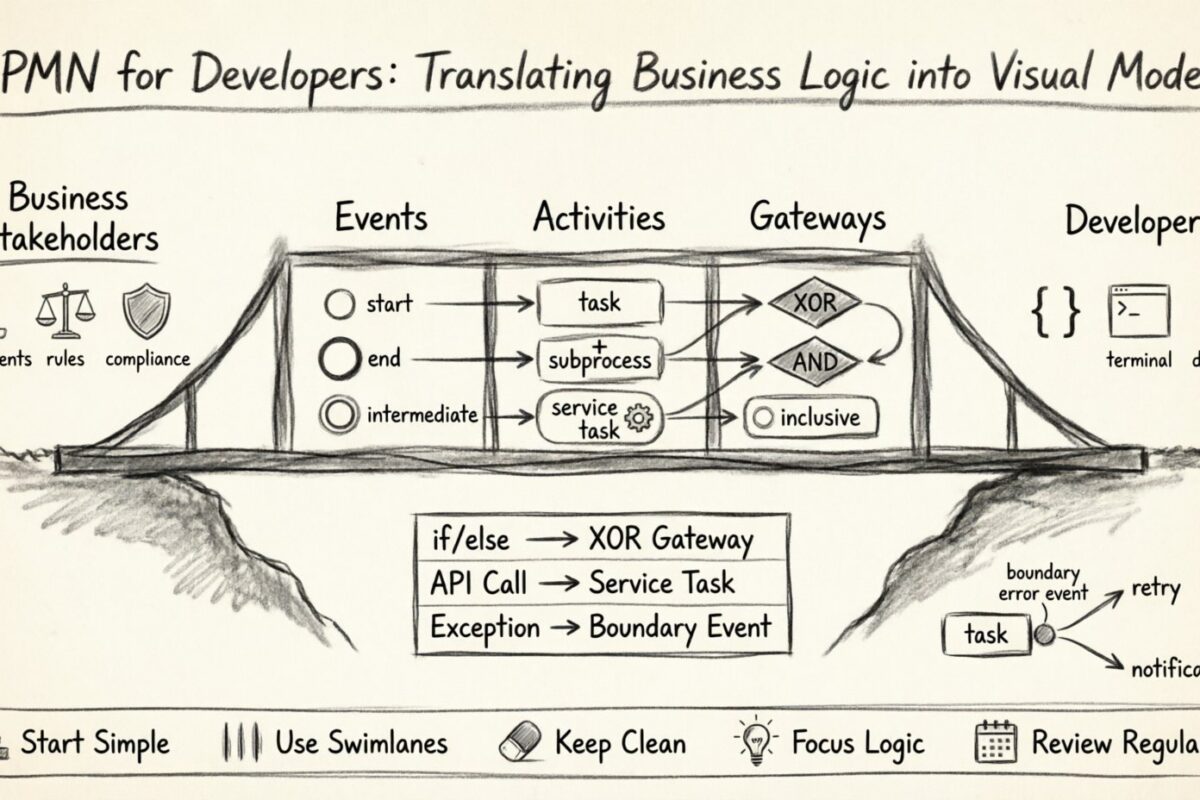
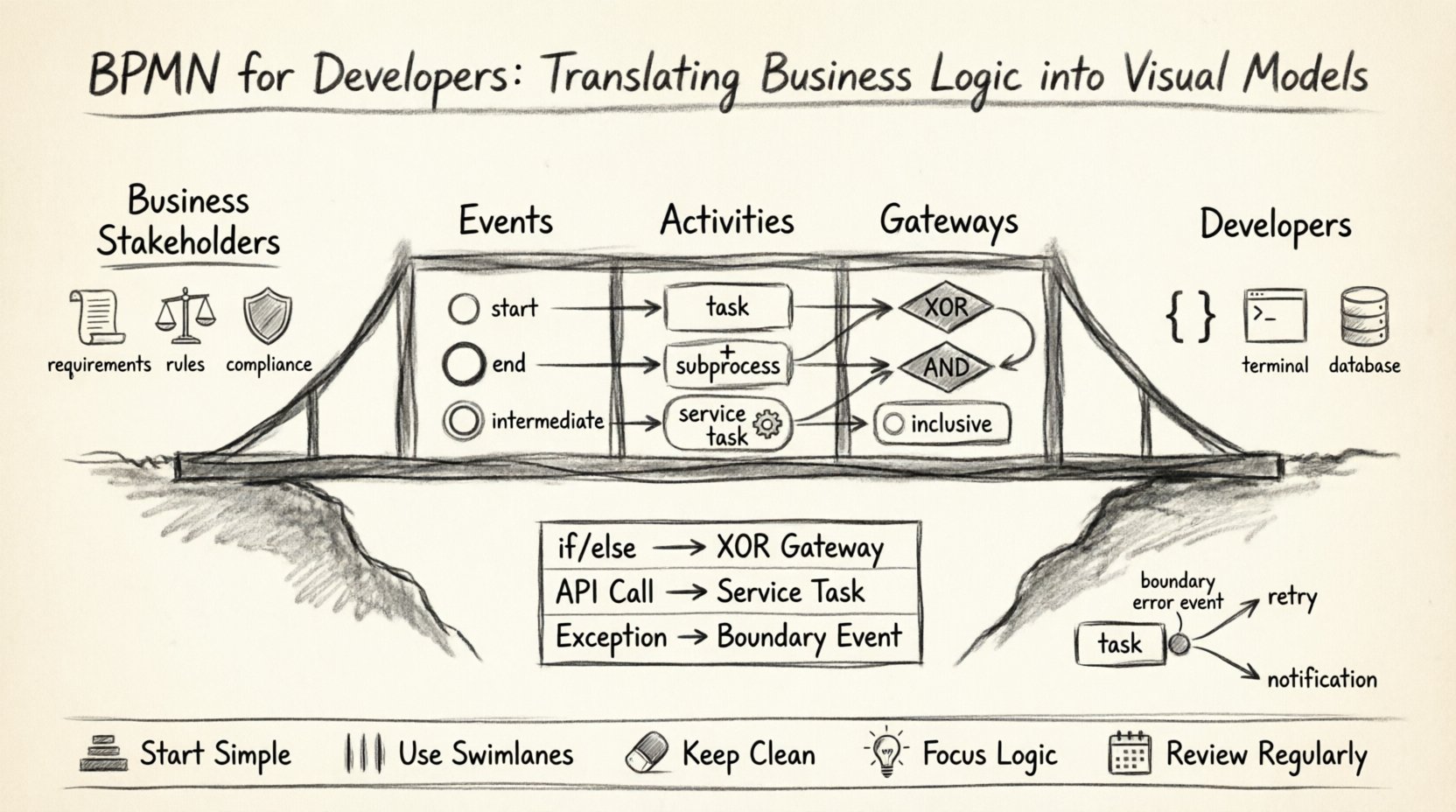
To translate logic effectively, you must understand the three primary categories of BPMN elements: Events, Activities, and Gateways. These form the skeleton of any process diagram.
1. Events 🟢
Events represent something that happens during the process. They are depicted as circles. In a developer context, these correspond to triggers or state changes.
- Start Event: The entry point. In code, this is often the entry point of a service or the trigger of an API endpoint.
- End Event: The termination point. This represents the completion of a task, a successful response, or a final state.
- Intermediate Event: Occurs between the start and end. These are crucial for asynchronous operations, such as waiting for a payment confirmation or receiving an external message.
2. Activities ⬜
Activities represent work being done. They are depicted as rounded rectangles. These map directly to functions, methods, or service calls.
- Task: A single unit of work. Usually corresponds to a function call or a database write.
- Subprocess: A complex activity collapsed into a single shape. Useful for managing complexity and hiding implementation details.
- Service Task: Represents a call to an external system or API.
3. Gateways ⬠
Gateways control the flow of the process. They are diamonds. This is where developers spend the most time, as this is where logic branches occur.
- Exclusive Gateway (XOR): Only one path is taken. This maps to an
if/elsestatement. - Parallel Gateway (AND): All paths are taken simultaneously. This maps to parallel execution or threading.
- Inclusive Gateway: One or more paths are taken based on conditions.
- Event-Based Gateway: The process waits for an event to occur (e.g., a timeout or a message) before proceeding.
💻 Mapping Code Constructs to Visual Symbols
The most effective way to learn BPMN is to map programming constructs to their visual counterparts. This mental model helps developers verify that their logic is sound before writing a single line of code.
| Programming Construct | BPMN Element | Behavioral Context |
|---|---|---|
if (condition) |
Exclusive Gateway | Flow splits based on a boolean condition. |
while (loop) |
Sequence Flow Backtrack | A path returns to a previous activity or gateway. |
| Parallel Execution | Parallel Gateway | Multiple tasks run concurrently without waiting for each other. |
| API Call | Service Task | External system interaction with input and output data. |
| Message Callback | Intermediate Message Event | Process waits asynchronously for a response. |
| Exception/Throw Error | Boundary Error Event | Specific handling for failures within a task. |
Understanding this mapping prevents logical errors. For example, if a developer assumes a task is synchronous in code but models it as an asynchronous message event in BPMN, the resulting implementation will differ in timing and state management.
🔄 Handling Complexity with Subprocesses
As processes grow, diagrams become cluttered. A single process diagram containing hundreds of tasks becomes unreadable. Subprocesses solve this by allowing you to nest logic.
There are two main types of subprocesses relevant to development:
Embedded Subprocess
This is the most common form. It is defined within the main process. You can open it to see the internal details. This is useful for modularizing code logic. For instance, a “Validate User” subprocess might contain checks for email format, password strength, and account status.
Call Activity
This references an external process definition. It is like calling a library or a microservice. If the logic for “Payment Processing” is shared across multiple applications, model it as a Call Activity. This promotes reusability and consistency.
When to Use a Subprocess
- Abstraction: When the internal details are not relevant to the high-level flow.
- Team Ownership: When a different team owns the logic inside the subprocess.
- Complexity Management: When a branch of logic has too many steps to fit comfortably on a page.
⚡ Asynchronous Operations and Message Flows
Modern applications are rarely linear. They interact with databases, external APIs, and user interfaces. BPMN distinguishes between internal process flows and external communication.
Internal vs. External Communication
Standard sequence flows (solid lines) represent logic within the same process instance. However, when two different processes need to talk, or a process talks to a human, you use Message Flows (dashed lines with an open arrow).
Asynchronous Patterns
Developers often struggle with state management in async scenarios. BPMN handles this explicitly.
- Wait for Response: Use an Intermediate Message Event. The process instance pauses and waits for a signal before continuing. This prevents blocking threads in the background.
- Timeouts: Use an Intermediate Timer Event. If a task takes too long, the process can move to a different branch, such as sending a reminder or escalating the issue.
- Event-Based Gateways: Useful when multiple outcomes are possible, and you do not know which will happen first (e.g., User Clicks Confirm OR System Times Out).
🛡️ Error Handling Strategies
Code often fails. Business processes must account for failure. In BPMN, error handling is visualized using Boundary Events attached to tasks.
Boundary Error Events
Instead of writing try-catch blocks in every function, you define a boundary event on a task. If the task fails, the process diverts to the error handler path.
Types of Handling
- Retry Logic: The process loops back to the task after a delay.
- Notification: The process sends an alert to an administrator while continuing or stopping.
- Compensation: If a task fails after a subsequent task has already run, you might need to undo the previous action (e.g., if payment fails after an order is placed, the order must be cancelled).
Visualizing error paths ensures that exceptions are not an afterthought. They become part of the core design.
🤝 Collaboration Across Roles
One of the greatest benefits of BPMN is the shared language it creates. However, developers and analysts often have different priorities.
| Role | Focus | BPMN Contribution |
|---|---|---|
| Business Analyst | Workflow, Rules, Compliance | Defines the high-level flow and business rules. |
| Developer | Implementation, Data, Performance | Validates feasibility, defines technical constraints, and maps tasks to code. |
| QA Engineer | Testing, Edge Cases | Uses the diagram to write test cases for all branches. |
By reviewing the model together, developers can identify logical gaps early. For example, a business analyst might forget to model what happens if a user cancels a request mid-process. A developer reviewing the diagram would spot the missing exit path.
📉 Maintenance and Version Control
Software changes. Processes change. A static diagram becomes a liability if it does not match the running system. Maintaining BPMN models requires a strategy.
Versioning
Just like code, processes need versions. When a change is made, the process definition should be versioned. This allows you to:
- Track what changed and why.
- Support multiple versions of a process running simultaneously.
- Rollback if a new version causes issues.
Documentation Hygiene
Ensure that every task and gateway has a clear label. Ambiguity in labels leads to confusion during maintenance. A developer reading a diagram six months later should understand the logic without asking the original author.
🚫 Common Pitfalls to Avoid
Even experienced developers make mistakes when modeling. Avoid these common errors to ensure your diagrams remain useful.
- Over-complication: Do not model every single step of a trivial task. Keep high-level flows high-level. Use subprocesses for detail.
- Ignoring Data: A flow without data is just a drawing. Ensure that inputs and outputs are defined for tasks, especially Service Tasks.
- Unreachable Paths: Check that every branch of a gateway has a path. Dead ends create stuck process instances.
- Missing Error Paths: If a task can fail, model the failure path. It is better to plan for the worst-case scenario.
- Confusing Gateways: Do not use an Exclusive Gateway for parallel tasks. Use a Parallel Gateway. Using the wrong gateway can cause logic errors where only one branch is taken instead of all.
🔗 Integration with Development Workflow
How do you fit this into your daily work? BPMN does not have to be a separate phase. It can be integrated into the sprint cycle.
Design Phase
Create the initial model during the requirements gathering. This serves as the technical specification. It forces stakeholders to agree on the logic before development begins.
Development Phase
Use the model to guide implementation. Each task in the diagram should correspond to a unit of work in the codebase. If a task is missing in the code, it is missing in the process.
Testing Phase
Use the diagram for test planning. Every path from the start event to the end event should be tested. This ensures full coverage of the business logic.
Deployment Phase
Ensure the deployed version matches the diagram. If the code diverges from the model, the model loses its value. Synchronization is key.
🎯 Summary of Best Practices
To succeed with BPMN as a developer, adhere to these principles:
- Start Simple: Begin with the happy path. Add error handling and edge cases later.
- Use Swimlanes: Use lanes to indicate who or what performs the task (e.g., System, User, External API).
- Keep it Clean: Avoid crossing lines. If lines cross, use a bridge or a subprocess to separate flows.
- Focus on Logic: The diagram must represent the actual execution order, not just the visual hierarchy.
- Review Regularly: Treat the diagram as living documentation. Update it when requirements change.
By treating BPMN as a technical specification rather than a business artifact, developers gain a powerful tool for clarity. It reduces the cognitive load of understanding complex workflows and ensures that the final application behaves exactly as intended. The visual model becomes a contract between the business need and the code that fulfills it.