Every organization operates on processes. Whether it is the way a customer places an order, how a software bug is resolved, or the steps taken to approve a budget, work flows through systems and people. For decades, we have relied on simple diagrams to map these flows. However, as business complexity grows, the limitations of traditional flowcharts become apparent. This is where the Business Process Model and Notation (BPMN) enters the conversation.
The debate is not merely about which tool looks better on a presentation slide. It is about semantic precision, execution capability, and the ability to bridge the gap between business strategy and technical implementation. This guide explores why process modeling requires a standardized language, the specific roles of flowcharts versus BPMN, and how to choose the right representation for your organizational needs.
📉 The Evolution of Process Mapping
Before diving into the technical distinctions, it is helpful to understand the context. Process modeling began with simple block diagrams used in manufacturing. The goal was clarity: Step A leads to Step B. If X happens, go to C. These early diagrams were intuitive but lacked the rigor required for modern enterprise systems.
As software systems became more complex, the need for precision increased. A simple arrow does not convey why a decision is made or how an exception is handled. This gap led to the development of standardized notations. BPMN was created to serve as a universal language, much like music notation or chemical symbols. It allows a process architect, a business analyst, and a developer to look at the same diagram and understand the exact same logic.
🧩 Understanding Flowcharts: The Foundation
Flowcharts remain a staple in project management and basic system analysis. They are familiar to almost everyone because they appear in manuals, documentation, and quick brainstorming sessions. However, their simplicity is also their Achilles’ heel.
Core Characteristics of Flowcharts
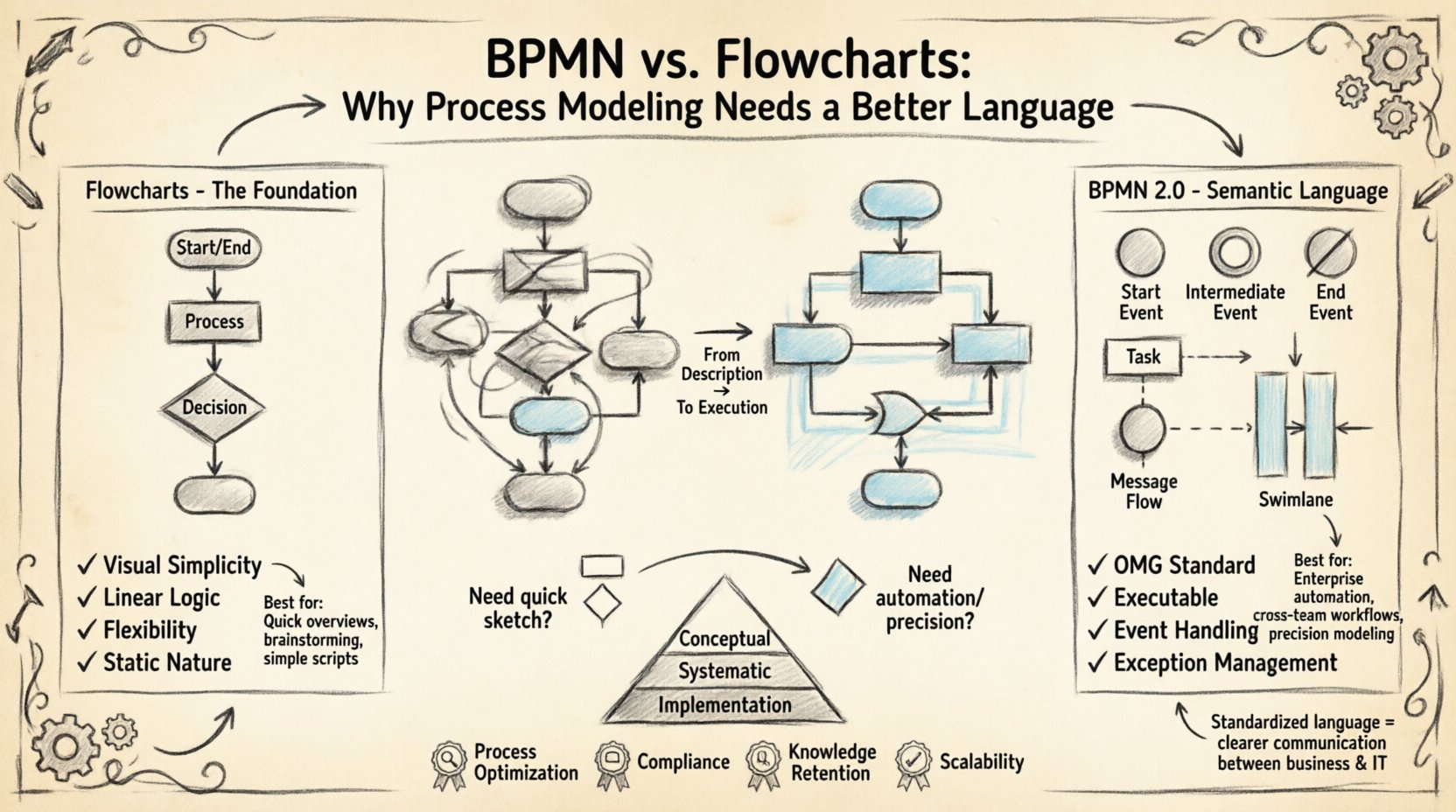
- Visual Simplicity: Shapes are often limited to ovals (start/end), rectangles (process), and diamonds (decision). This makes them easy to read for non-technical stakeholders.
- Linear Logic: They excel at showing a straight path from input to output. They are ideal for algorithms or simple operational steps.
- Flexibility: There is no governing standard. You can draw a flowchart however you like, which can lead to inconsistency across teams.
- Static Nature: Flowcharts describe logic, but they do not inherently define how the process executes in a system.
When Flowcharts Work Well
There is still a valid place for flowcharts. They are excellent for:
- High-level overviews for executive summaries 📌.
- Documenting simple scripts or code logic.
- Quick brainstorming sessions where speed matters more than precision.
- Processes that do not involve complex state management or external system triggers.
🏗️ The BPMN Standard: A Semantic Language
BPMN 2.0 is an open standard managed by the Object Management Group (OMG). It is designed specifically to model business processes. Unlike flowcharts, which are generic, BPMN defines specific meanings for every symbol, connection, and event.
Key Components of BPMN
BPMN is built on four main categories of elements, each serving a distinct purpose in the modeling ecosystem.
- Flow Objects: These include Events (what happens), Activities (what is done), and Gateways (decisions). They form the backbone of the process.
- Connecting Objects: These define the sequence flow, message flow, or association between elements. They clarify who talks to whom.
- Swimlanes: These partition the process by participants. A lane can represent a department, a system, or a specific role. This visualizes responsibility clearly.
- Artifacts: These include groups, annotations, and data objects. They provide context without cluttering the flow.
Why Semantics Matter
In a flowchart, a diamond means “decision.” In BPMN, a gateway can be an Exclusive Gateway (one path or another), an Inclusive Gateway (one or more paths), or a Parallel Gateway (all paths simultaneously). This distinction is critical. If a developer assumes a parallel split when the business rule requires a single choice, the resulting system will fail. BPMN removes this ambiguity.
🆚 BPMN vs. Flowcharts: A Direct Comparison
Understanding the differences requires looking at specific dimensions of process modeling. The table below outlines the structural and functional distinctions.
| Feature | Flowchart | BPMN (Business Process Model and Notation) |
|---|---|---|
| Standardization | None. Ad-hoc shapes. | Strict OMG Standard (ISO 19510). |
| Audience | General public, IT teams. | Business Analysts, Developers, Stakeholders. |
| Complexity | Low to Medium. | Low to High (with levels). |
| Execution | Descriptive (Human-readable). | Executable (Machine-readable). |
| Event Handling | Implicit or vague. | Explicit (Start, Intermediate, End). |
| Exception Management | Difficult to model. | Designed for Exceptions (Error Events). |
🔄 The Execution Gap: Descriptive vs. Executable
One of the most significant differences lies in the ability to execute the model. A flowchart is a description of a process. It tells humans what should happen. BPMN, specifically Version 2.0, is designed to be executable.
When you create a BPMN diagram, you are not just drawing a picture. You are defining a set of rules that a process engine can interpret. This allows organizations to automate processes directly from the model. For example, a BPMN diagram can define that a task must be assigned to a specific role before a timer starts. This logic is embedded in the notation.
With flowcharts, you must manually translate the diagram into code. This translation introduces errors. A developer might interpret a decision diamond differently than the business analyst intended. BPMN reduces this translation layer because the notation aligns closely with the logic required by automation engines.
📐 Levels of Abstraction in BPMN
One criticism of BPMN is that it can become overly complex. To address this, the standard supports different levels of modeling. This ensures that the diagram matches the audience’s needs.
- Level 1: Conceptual (Ad-Hoc): High-level view for stakeholders. Focuses on major phases without granular detail. Often looks similar to a flowchart but with BPMN structure.
- Level 2: Systematic: Adds responsibility and system interactions. This is where swimlanes become critical. It clarifies who does what within the organization.
- Level 3: Implementation: Detailed enough to be executed by a system. Includes data objects, specific messages, and technical rules.
This hierarchy allows a single model to serve multiple purposes. You can present the Level 1 view to the board and hand the Level 3 view to the engineering team. Both diagrams describe the same process, but with different levels of detail appropriate for their context.
⚠️ Common Pitfalls in Process Modeling
Adopting a better language does not guarantee better processes. There are common mistakes that teams make when transitioning from flowcharts to BPMN.
1. Over-Modeling
It is tempting to model every single detail. However, a process diagram that is too detailed becomes unreadable. It turns into a spaghetti diagram that confuses more than it clarifies. Use the appropriate level of abstraction. If the process is for communication, simplify. If it is for automation, detail.
2. Ignoring the Exception Path
Flowcharts often show the “Happy Path” (everything goes right). BPMN should explicitly model what happens when things go wrong. This includes Error Events and Compensation Activities. If a process fails halfway, how does it recover? A robust model answers this.
3. Mixing Roles and Systems
Swimlanes should be consistent. Mixing human roles with system names in the same lane can create confusion. Decide on a convention: either all lanes are human roles, or all are system components. Consistency aids readability.
4. Forgetting the Data
A process moves data. In BPMN, data objects should be explicitly linked to activities. A task that processes an invoice needs to know which invoice. Flowcharts rarely capture this data context. BPMN makes the data flow visible alongside the control flow.
🤝 Bridging the Communication Gap
The primary goal of BPMN is communication. It acts as a bridge between the business side and the IT side. Without a shared standard, these two groups often speak different languages.
Business stakeholders care about value, efficiency, and compliance. IT stakeholders care about logic, performance, and architecture. BPMN provides a common vocabulary. When a business analyst says “Parallel Gateway,” the developer knows exactly what logic to write. When a business stakeholder sees an “Error Event,” they understand that the system handles failures automatically.
This shared understanding reduces the need for repetitive clarification emails and meetings. It speeds up the delivery of digital solutions. When the model is clear, the implementation is faster.
🚀 Strategic Benefits of Standardization
Organizations that adopt BPMN as their primary modeling language gain strategic advantages beyond simple diagramming.
- Process Optimization: Standardized models allow for easier comparison. You can analyze bottlenecks more effectively when the notation is consistent.
- Compliance: Auditors can verify processes against a standard. BPMN diagrams serve as documentation that meets regulatory requirements.
- Knowledge Retention: When employees leave, the process remains in the model. It is not stored in the heads of specific individuals.
- Scalability: As the organization grows, processes become more complex. BPMN scales better than ad-hoc diagrams to handle this growth.
🛠️ Implementation Considerations
Moving from flowcharts to BPMN requires a shift in mindset. It is not just about changing the shape of the boxes. It is about changing how you think about the process.
Training and Adoption
Teams need training. Understanding the difference between a Task, a Sub-Process, and a Call Activity takes time. Invest in workshops to ensure that analysts and developers are using the notation correctly. Do not allow informal shortcuts that break the standard.
Tool Selection
Choose modeling tools that support the BPMN 2.0 standard natively. Avoid tools that claim to support BPMN but only offer visual shapes without semantic meaning. The tool should validate your diagram against the standard rules.
Integration with Lifecycle
Integrate process modeling into your development lifecycle. Do not treat it as a separate phase. The model should inform the design, the code, and the testing. If the model changes, the code should reflect that change immediately.
🌟 The Future of Process Modeling
As organizations move towards automation, AI, and hyper-automation, the need for precise process models will only increase. BPMN is evolving to support these changes. New features allow for better integration with external systems and more complex event-driven architectures.
The trend is towards “Process Mining” as well. This involves comparing the actual system logs against the designed BPMN model to find deviations. This feedback loop ensures that the “as-is” process matches the “to-be” design. Flowcharts cannot support this level of analytical depth.
✅ Summary: Choosing the Right Tool
So, which should you use? The answer depends on the goal.
- Use Flowcharts for: Quick communication, simple logic, educational materials, and non-executable documentation.
- Use BPMN for: Enterprise processes, automation projects, cross-departmental workflows, and any scenario requiring precision and execution.
Process modeling is not about drawing pretty pictures. It is about defining the rules of operation. By adopting a standardized language like BPMN, organizations reduce ambiguity, improve automation, and foster better collaboration between business and technology. The investment in learning and implementing this standard pays dividends in efficiency and clarity.
Start by auditing your current models. Where are the ambiguities? Where does the translation from diagram to code fail? These are the signs that a better language is needed. Adopting BPMN is a step toward maturity in process management.