In the complex landscape of software development, the disconnect between high-level vision and granular execution is a common source of friction. Teams often begin building features based on a list of tasks, yet end up delivering incomplete functionality or experiences that feel disjointed to the end user. This gap usually stems from a lack of clear alignment between the macro-level user journey and the micro-level user story. To bridge this divide, we must systematically map user journeys to identify missing story requirements.
This process ensures that every step a user takes is accounted for, validated, and technically feasible. By visualizing the full path, product teams can uncover hidden dependencies, edge cases, and acceptance criteria that typically slip through the cracks during standard sprint planning. This guide explores the methodology for effective mapping, the risks of skipping this step, and the practical frameworks to implement.
🧱 Understanding the Core Concepts
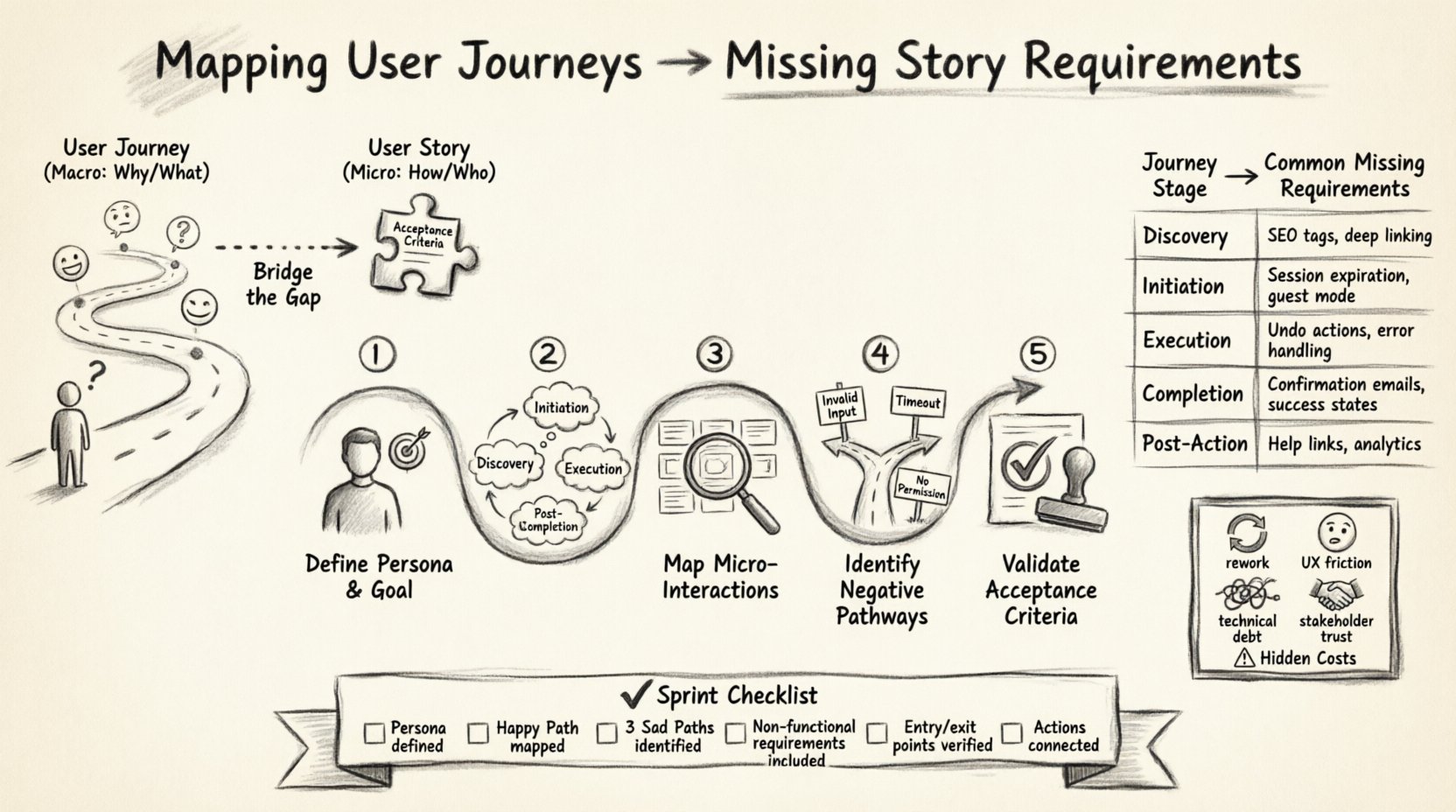
Before diving into the mapping process, it is essential to define the two primary artifacts involved: the User Journey and the User Story. While they are often used interchangeably in casual conversation, they serve distinct purposes in the development lifecycle.
🌐 What is a User Journey?
A User Journey represents the complete end-to-end experience of a user interacting with a product or service. It is not just a feature list; it is a narrative that describes the user’s goals, emotions, touchpoints, and actions over time. A journey map often spans multiple sessions, devices, and contexts.
- Scope: High-level, holistic, and chronological.
- Focus: The ‘Why’ and ‘What’ from the user’s perspective.
- Output: Visual diagrams showing stages like Awareness, Consideration, Action, and Retention.
📝 What is a User Story?
A User Story is a specific, actionable unit of work derived from the product backlog. It is written in a format that describes a specific need for a specific persona. Stories are the building blocks of a sprint and are sized to be completed within a short timeframe.
- Scope: Low-level, specific, and isolated.
- Focus: The ‘How’ and ‘Who’ from the development perspective.
- Output: Textual description with Acceptance Criteria.
When these two artifacts are not connected, developers may build the ‘How’ without fully understanding the ‘Why’, leading to solutions that solve a local problem but break the global flow.
⚠️ The Hidden Cost of Unmapped Requirements
Skipping the mapping phase often leads to significant technical debt and user friction. When requirements are identified in isolation, they tend to focus on the ‘Happy Path’—the ideal scenario where everything goes right. However, real-world usage is rarely ideal. Here are the specific costs associated with missing requirements:
- Increased Rework: Features built without considering the surrounding context often need to be refactored once the full flow is tested.
- Confusing User Experience: Users may encounter dead ends, broken links, or inconsistent states if the journey is not coherent.
- Technical Debt: Quick fixes for missing edge cases often result in spaghetti code that is difficult to maintain later.
- Stakeholder Dissatisfaction: Delivering a feature that works in isolation but fails in context leads to a loss of trust.
Consider a scenario where a team builds a ‘Checkout’ button. They define the story as “As a user, I want to click the button to pay.” If the journey mapping is skipped, the story might miss requirements for payment gateway errors, session timeouts during the process, or the ability to save the cart for later. These are journey-level requirements that impact the story.
🛠️ A Framework for Effective Mapping
To systematically identify missing requirements, follow this structured framework. This approach moves from broad context to specific implementation details.
1️⃣ Define the Persona and Goal
Start by explicitly stating who is performing the journey and what they are trying to achieve. A user journey for a ‘New Subscriber’ differs vastly from a ‘Returning Premium Member’.
- Persona: Define demographics, technical proficiency, and motivation.
- Goal: State the primary objective (e.g., “Complete a purchase,” “Reset a password,” “Upload a document”).
2️⃣ Outline the High-Level Stages
Break the journey down into sequential stages. Do not focus on UI elements yet; focus on the user’s mental state.
- Stage 1: Discovery (How they find the feature)
- Stage 2: Initiation (Starting the process)
- Stage 3: Execution (Doing the work)
- Stage 4: Completion (Finalizing the action)
- Stage 5: Post-Action (What happens next)
3️⃣ Map Micro-Interactions to Stories
For each stage, identify the specific interactions required. These interactions become the raw material for User Stories. Ask questions like: “What data is needed here?” “What systems are involved?” “What happens if the network fails?”
4️⃣ Identify Negative Pathways
This is where most requirements get missed. Map out what happens when things go wrong.
- Input Validation: What if the user enters invalid data?
- Permission Errors: What if the user lacks access mid-flow?
- Network Issues: How does the app handle disconnection?
- System Outages: What is the fallback state?
5️⃣ Validate Acceptance Criteria
Review the drafted stories against the journey map. Does the story cover the entry and exit points of that journey stage? If a story stands alone without connecting to the previous or next step, it is likely incomplete.
📊 Aligning Journey Stages with Story Types
The table below illustrates how high-level journey stages translate into specific types of user stories. This helps teams categorize their backlog and ensure balance between functional and non-functional requirements.
| Journey Stage | Story Focus | Common Missing Requirements |
|---|---|---|
| Discovery | Visibility & Access | SEO tags, deep linking, external redirect handling |
| Initiation | Onboarding & Auth | Session expiration, guest mode, data persistence |
| Execution | Core Functionality | Undo actions, saving progress, error handling |
| Completion | Feedback & Confirmation | Confirmation emails, success states, navigation flow |
| Post-Action | Retention & Support | Help links, feedback forms, analytics tracking |
🔍 Identifying the “Invisible” Requirements
Some requirements are invisible until the system is under load or the user encounters a specific edge case. Mapping the journey forces these into the light.
🕒 Time-Based Constraints
Journeys often span time. A user might start a process and return days later. Does the system remember their state? This leads to stories about:
- Session timeout handling.
- Cache invalidation policies.
- Data retention rules.
🔐 Security and Compliance
Every stage of a journey involves data. Mapping ensures security stories are not an afterthought.
- Encryption: Is data encrypted at rest and in transit for this specific flow?
- Access Control: Does the user need permission to view the previous stage’s data?
- Audit Logs: Do we need to record who did what and when?
📱 Device and Environment
Users do not always have a perfect screen or connection. The journey must account for:
- Mobile vs. Desktop layout shifts.
- Offline mode capabilities.
- Screen reader compatibility.
🤝 Facilitating Collaborative Workshops
Mapping is rarely a solo activity. It requires input from Design, Development, QA, and Product Management. A collaborative workshop ensures diverse perspectives on what is “missing”.
- Preparation: Gather existing documentation, analytics, and support tickets regarding the feature.
- Visualization: Use a whiteboard or digital canvas to draw the journey. Keep it physical or large-screen to encourage participation.
- Budgeting: Assign time limits to each stage to keep the workshop focused.
- Recording: Capture every idea, even if it seems out of scope. It can be prioritized later.
During the workshop, encourage the team to ask “What if?” questions. “What if the user closes the tab?” “What if the server crashes?” These questions drive the identification of non-functional requirements.
🔄 Validation and Feedback Loops
Once the stories are written, the mapping process is not finished. Validation ensures the stories actually reflect the intended journey.
🧪 Prototype Testing
Build a low-fidelity prototype that mimics the mapped journey. Walk through it with a tester who is not the developer. Observe where they hesitate or get confused. This highlights gaps in the requirements.
🗣️ User Testing
Where possible, get feedback from actual users. Ask them to perform the task. Their natural behavior often reveals assumptions the team made about the journey that were incorrect.
📈 Analytics Review
After launch, compare actual usage data against the mapped journey. If users drop off at a specific stage, that indicates a missing requirement or a friction point that was underestimated during the mapping phase.
📈 Measuring the Impact of Better Mapping
How do you know if this effort is worth it? Track the following metrics to validate the improvement in your development process.
- Defect Leakage: Measure the number of bugs reported in production that relate to flow errors. This should decrease as mapping improves.
- Sprint Velocity: Does the team estimate stories more accurately? Fewer surprises during refinement mean better velocity.
- Customer Satisfaction: Monitor NPS or CSAT scores for the specific feature. A smoother journey usually correlates with higher satisfaction.
- Rework Rate: Track the percentage of stories that require rework due to missing context.
🛡️ Integration with Technical Architecture
Mapping user journeys also helps architects understand the system implications. When a journey spans multiple services, the stories must account for API dependencies.
- API Contracts: Does the story define the input/output for the backend service?
- Data Consistency: If a journey updates data in two places, is there a transaction management story?
- Performance: Are there stories for load times specific to this journey? (e.g., “Load within 2 seconds”).
By integrating technical constraints into the journey map, you prevent the common pitfall of designing a beautiful flow that the architecture cannot support efficiently.
💡 Final Thoughts on Journey Alignment
The gap between vision and execution is where value is lost. By rigorously mapping user journeys to identify missing story requirements, teams can build software that is not just functional, but coherent and resilient. This approach shifts the focus from individual tasks to the holistic experience, ensuring that every line of code contributes to a seamless user narrative.
Implementing this framework takes time and discipline, but the return on investment is a product that works reliably under real-world conditions. Start small. Map one key journey. Identify the missing pieces. Refine the stories. Repeat. Over time, this becomes a natural part of your development rhythm, leading to higher quality software and happier users.
🚀 Actionable Checklist for Next Sprint
Before starting your next sprint, run through this quick checklist to ensure your stories are journey-aligned.
- ☐ Have we defined the persona for this feature?
- ☐ Have we mapped the ‘Happy Path’ from start to finish?
- ☐ Have we identified at least three ‘Sad Paths’ (error states)?
- ☐ Do the stories include non-functional requirements (performance, security)?
- ☐ Have we verified the entry and exit points for each story?
- ☐ Is there a clear connection to the previous and next user actions?
Adopting this mindset ensures that you are building the right thing, in the right way, for the right people.